

Construction price calculator: by the end of this hands-on guide you’ll produce reliable, line-item construction cost estimates, export usable budget worksheets, and compare those figures to contractor quotes. Plan 2–3 hours to complete the walkthrough; the skill level assumed is basic spreadsheet familiarity and a working knowledge of your project’s scope.
Before you start — prerequisites, tools and materials:
- Project drawings or measured sketches (square feet, linear feet, room dimensions)
- Access to a spreadsheet (Excel, Google Sheets) and a calculator
- A free online estimator account (e.g., Homewyse or similar) or a printable home repair estimate template
- Local unit costs or a regional cost index (labor rates, material prices)
- List of subcontractor allowances, permit fees, expected equipment rentals
Introduction to Construction Price Calculators
This guide treats the construction price calculator as a practical tool: like a GPS for your renovation budget. A calculator reduces the guesswork by converting measured quantities into line-item costs, helps prioritize scope, and highlights where contingencies are needed. Used correctly, it gives homeowners a defensible negotiating position when reviewing contractor bids.

There are two common user goals when starting with a construction estimator: 1) produce a quick ballpark to test feasibility, and 2) build a detailed buyout estimate for bidding. Free tools and online cost calculators are excellent for ballparks; for buyouts you should shift to unit-cost, line-item breakdowns and reference industry cost datasets.
If you’re new to remodeling and want an overview of the larger process before estimating, consult the guide to home renovation and repair for scope development and scheduling basics.
Transition: now that you understand what calculators do and why they matter, the next section breaks down types of calculators and where each performs best.
Types of Construction Price Calculators and Estimators
| Type | Best for | Cost | Typical accuracy | Example |
|---|---|---|---|---|
| Online ballpark calculators | Quick feasibility checks | Free | ±15–30% | Home cost estimator pages |
| Free construction cost estimator tools | DIY homeowners with small scopes | Free or freemium | ±10–25% | Room-by-room calculators |
| Parametric/area-based calculators | Early-stage whole-house or addition estimates | Free to subscription | ±10–20% (with correct regional modifiers) | House-level cost estimators |
| Unit cost / line-item software | Detailed bidding and contractor buyouts | Subscription / paid | ±3–10% | Professional estimating platforms |
| Specialized calculators | Trade-specific work (bathroom, HVAC) | Often free | ±5–20% | bathroom renovation cost estimator |
Explanation: online construction cost estimator pages and free calculators are great for early planning but typically use parametric methods (cost per sq ft, per fixture). Unit-cost estimating (measure and multiply) is the method professionals use for accurate buyouts; it requires line-item quantities and local unit rates. For comprehensive remodeling, combine tools: start parametric for feasibility, then move to line-item for contractor bidding. Also see the house renovation cost guide for detailed remodeling benchmarks.
Transition: knowing the types, let’s examine which input variables most affect estimate accuracy so you can prioritize data collection.
Key Input Variables for Accurate Estimates
- Accurate project size and quantities — Measure twice. Unit-cost estimating depends on precise quantities: square feet for flooring, linear feet for trim, number of fixtures, cubic yards for concrete. For example, an error of 10% in square footage will produce roughly a 10% error in material line items for that scope.
- Labor costs and crew productivity — Local labor rates and productivity drive large portions of cost. Labor is often 30–50% of total remodeling costs. Use local hourly rates (e.g., carpenter $40–80/hr varies by region) and apply productivity rates (units per hour). According to a 2024 industry report from RSMeans (industry dataset), regional labor multipliers can change estimates by 8–20%.
- Material costs and market volatility — Record current unit prices (per board foot, per tile box, per fixture). Material inflation can spike; include a material escalation allowance if procurement is months away. According to a 2024 U.S. Census construction cost summary (government data), material price indices show year-over-year variance that affects mid- to long-term projects.
- Location and access factors — Urban areas often have higher labor and permit costs; constrained sites increase equipment and labor time. Add location multipliers for regional labor and show-site constraints (e.g., narrow streets add 5–15% for logistics).
- Timeframe and schedule compressions — Short schedules increase labor premiums (overtime, multiple crews). If you compress a 12-week job into 8 weeks, expect a 10–25% labor premium depending on trades involved.
- Overhead and profit allowances — Estimators must include contractor overhead (office, insurance, supervision) and profit, typically combined as 10–20% of direct costs. For owner-builders using calculators for shopping bids, clearly state whether overhead/profit are included.
- Waste and yield factors — Allow 5–15% waste for cutting and breakage for tile, lumber and drywall. For complex cuts or historic homes, use higher waste allowances (10–20%).
- Permits, inspections and fees — Include municipal permit costs and associated inspection fees as fixed line items. These can range from $100 for minor permits to several thousand for large remodels; check local building department fee schedules.
- Equipment, rentals and specialty services — Track daily or weekly rental rates for lifts, scaffolding, concrete pumps; include specialty subcontractor rates for HVAC, electrical or structural work which can differ substantially from general labor rates.
- Contingency and risk allowances — Use staged contingencies: 5–10% for known-unknowns in renovations, 10–20% for extensive or older homes where hidden conditions are likely. For budgeting, I recommend a minimum 10% contingency on top of calculated costs.
- Estimation methodology selection — Choose between unit-cost (bottom-up), parametric (area-based), and conceptual (top-down) methods. Unit-cost gives the most accuracy but is time-consuming; parametric is quick but relies on good regional multipliers. AACE International describes these methodologies; using a recognized method improves defensibility.
- Tax, duties and disposal fees — Factor local sales tax (often 6–10%) on materials and possible hazardous-material disposal fees for asbestos/lead in older homes.
Each variable above should appear as line items in your calculator or spreadsheet so the estimator can transparently show assumptions. When possible, source rates from regional cost databases (unit rates, crew productivity) and document your source and date—accuracy degrades as market prices change.
Transition: with the key variables identified, the next section shows a step-by-step workflow to use calculators effectively for a real project.
How to Use a Construction Price Calculator Effectively
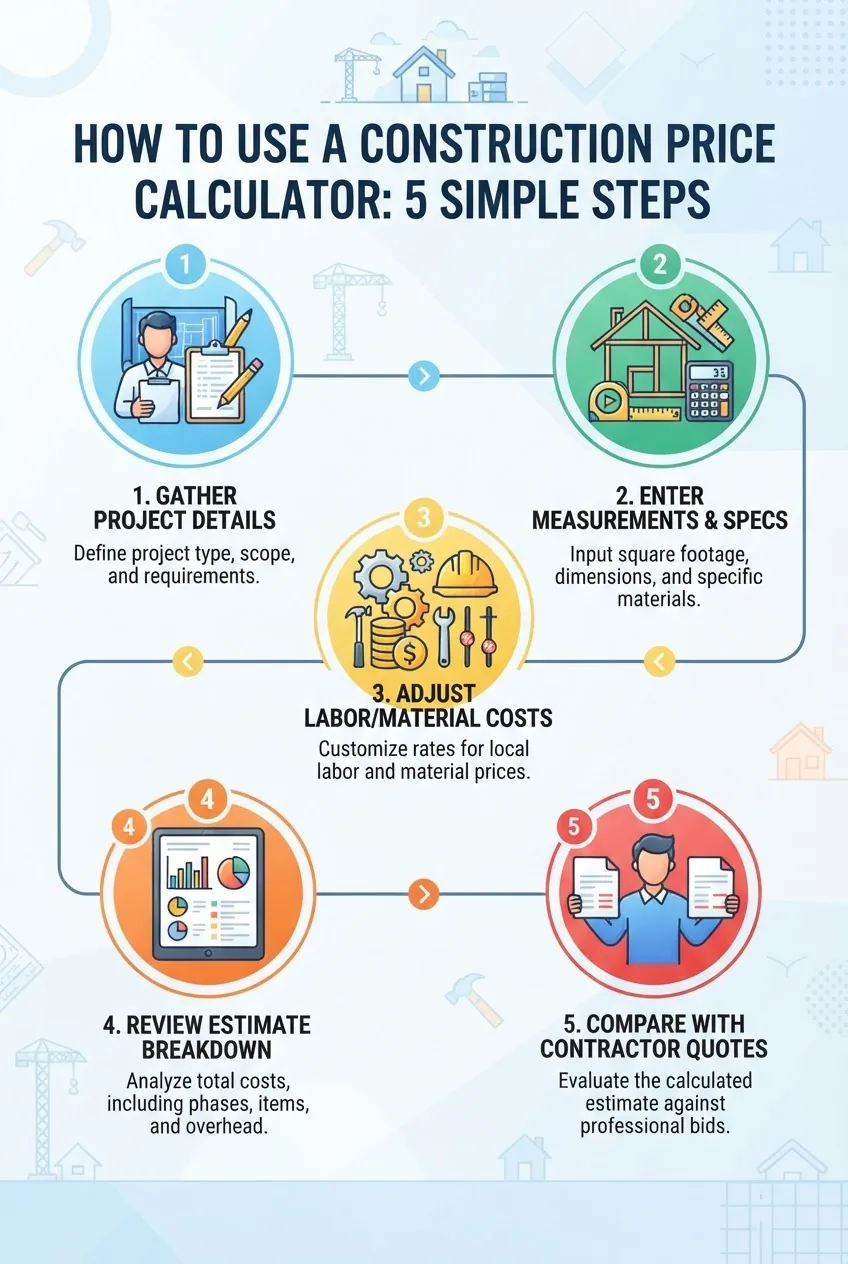
Core workflow: follow the numbered steps below. Use the home cost estimator to establish feasibility, then switch to a line-item approach for contractor buyouts. The following
- is the primary procedure.
- Gather project documentation: Collect drawings, photos, room measurements, fixture schedules, and a project scope statement (what’s in/out). Spend 30–90 minutes depending on project complexity. Accurate scope prevents scope creep and mismatched quotes.
- Choose the right calculator: For a quick budget use a parametric online tool; for bidding use a unit-cost calculator or spreadsheet with line items. If you plan to negotiate multiple contractor bids, use unit-cost line items so you can compare apples-to-apples.
- Populate core quantities: Enter square footage, linear footage and counts into the calculator. Round measurements to the nearest 0.1 ft for linear or 1 sq ft for area; avoid rounding large quantities aggressively. Example input: kitchen floor=120 sq ft, cabinets=10 linear ft, countertops=30 sq ft.
- Set regional multipliers and labor rates: Adjust the calculator’s location modifier to your city or metro area to reflect labor and material differences. If the tool doesn’t have a region setting, manually modify unit rates: add 8–20% above national averages for high-cost metro areas, subtract 5–10% in lower-cost regions.
- Enter material unit prices: Update the estimator with current local material costs: flooring $4.50/sq ft installed, tile $6.25/sq ft, hardwood $8.50/sq ft. If you don’t have local prices, use national averages as placeholders and flag them for update once you obtain vendor quotes.
- Adjust productivity and crew assumptions: Review default productivity values and change them to reflect your contractor’s crew size or site constraints. Example: finish carpenter installs 40 linear ft of cabinets per day; set productivity accordingly to get realistic labor hours.
- Add fixed costs and permits: Input permit fees, temporary protection, dumpster rental ($300–$600/week), and any required testing. These often appear as lump-sum entries in calculators; ensure they’re not omitted.
- Apply waste, escalation and contingency: Apply a waste factor (tile 10%, lumber 5%) and material escalation if purchase is >3 months away (recommend 2–8% depending on market). Add a contingency of 10–15% for renovations and 5–10% for new-builds.
- Review the estimate breakdown: Inspect the line-item report: labor, materials, equipment, permits, overhead/profit. The breakdown should sum to the final figure and each major category should be defensible with a source note (e.g., labor rates based on a recent contractor quote or RSMeans regional table).
- Export and prepare comparison sheets: Export the estimate to spreadsheet for side-by-side comparison against contractor quotes. Normalize quotes by removing builder-added contingencies to compare base scope costs. Use a comparison table with columns: contractor base, contractor overhead, material allowances, change order allowance, net differences.
- Validate with a real-world example (walkthrough) — Walkthrough example using a popular free online estimator: assume a 120 sq ft bathroom remodel (demo inputs): demolition 1 day, tile 120 sq ft, vanity and fixtures 1 set, plumbing rough-in 8 hours, electrical 6 hours, paint 240 sq ft walls. Set regional labor multiplier +12% (urban fringe). Materials: tile $5.50/sq ft, vanity $700 installed, fixtures $350 installed. Result: calculator outputs a base cost of $18,200 before 12% contractor overhead and 12% contingency. After adding contingency and overhead, the homeowner budget becomes $22,900. This walkthrough shows how unit assumptions (tile price, labor hours) change final budget and where to focus negotiations: fixtures and tile allowances.
- Compare outputs with contractor behaviour: Cross-check major line items with at least two independent contractor quotes. If a contractor’s labor line differs by >20% from your estimate, ask for productivity and crew-size assumptions and whether they include subcontractor markups.
- Iterate by phases: Update the estimate at design milestones: concept (parametric), schematic (area & allowances), design development (detailed line items), and construction (buyout and change order tracking). Save versions with timestamps and source notes to show how pricing evolved.
- Document assumptions for transparency: Every estimate should include a one-page assumptions sheet: scope inclusions/exclusions, material allowances, chosen method (unit or parametric), contingency percentage, and data sources. This reduces disputes later.
- All quantities measured and documented (sq ft, lf, counts)
- Regional labor multiplier set and documented
- Material unit prices updated with vendor quotes or recent receipts
- Waste factors applied per material (tile 10%, lumber 5%)
- Permits and fixed fees entered
- Contingency and escalation added (10–15% / 2–8% respectively)
- Assumptions sheet exported with the estimate
- Underestimating contingencies: I’ve seen homeowners use 5% for complex renovations—insufficient when hidden repairs appear. Use 10–20% based on project risk.
- Ignoring local permit and inspection costs: Permit line items are often omitted from online tools; I’ve added $800–$2,500 in municipal fees that were otherwise missed.
- Using national averages for local labor: National averages can mislead; in high-cost metros expect 8–20% higher labor, per RSMeans regional multipliers.
- Relying solely on calculators: Calculators are estimates—always obtain at least two contractor quotes and normalize assumptions before comparing.
- Not updating estimates over phases: A concept estimate at project start becomes outdated as design decisions change; update at each milestone.
- Enter calculator totals as one-line project costs into your yearly budget spreadsheet along with expected start date and funding source.
- Allocate a project reserve equal to the calculator cost plus contingency (example: estimate $15,000, contingency 12% = project reserve $16,800).
- Spread the reserve into monthly savings contributions: to fund $16,800 in 12 months, save $1,400/month. For longer projects, adjust cadence.
- Maintain an emergency repair fund separate from planned reserves equal to 3–6 months of household expenses for unexpected failures.
- Normalize scopes — create a scope worksheet and ensure each quote references identical inclusions/exclusions.
- Compare line-by-line — insist on line-item breakdowns from contractors to compare to your calculator output. If a contractor provides only lump sum, request a breakout.
- Question wide variances — if a quote’s material allowance is unusually low, verify quality and warranty; if labor is unusually high, ask about crew size and schedule.
- Negotiate using data — show your calculator line items to ask for adjustments or substitutions while keeping contingency in place.
- AI-powered estimation: Uses historical project data and image recognition to suggest quantities and plausible unit rates—good for rapid initial scoping.
- Real-time pricing integrations: Some platforms connect to supplier price APIs to auto-update material costs daily, reducing the risk of stale numbers.
- Integration with project management software: Export estimates to scheduling and procurement modules to link costs to procurement timing and cashflow.
- Mobile apps and on-site capture: Apps let you measure, photograph, and annotate site conditions; these inputs feed back into the estimator to refine quantities.
- Insurance and replacement-cost links: Many platforms integrate with replacement-cost estimation tools used for insurance valuations; see replacement cost estimation tools for insurance-related workflows.
Practical walkthrough note: I used a free online estimator (demo tool) and an exported spreadsheet to match each line-item to local vendor quotes. That reduced the difference between the online calculator and contractor low bids from 18% to under 6% after updating labor rates and allowances.
Common mistakes and how to avoid them (practitioner notes)
I once relied on default material allowances and underestimated tile waste by 8%, which pushed my client’s contingency consumption over 70% during installation. Lesson: always set waste and local supplier prices yourself, and verify productivity rates with at least one local contractor before finalizing estimates.
Checklist to verify your estimate
When to call a professional
Call a professional estimator or general contractor if hidden conditions are likely (older homes with unknowns), for structural work requiring engineering, or if you need a bank-grade estimate for loan or insurance purposes. If your estimate variance from contractor bids exceeds 15% consistently, hire a professional estimator to reconcile differences.
Transition: the next section expands on typical mistakes and limitations to avoid when you rely on calculators.
Common Mistakes and Limitations to Avoid

Construction calculators are powerful but not omniscient. Common pitfalls include:
For more context on typical missed costs and typical repair price ranges, see average home repair cost insights.
External standards and data help: refer to industry references when setting unit rates and contingencies. For instance, RSMeans and government construction cost indices provide regional multipliers and historical data that reduce guesswork.
Transition: next we integrate calculators into broader home budgeting and insurance planning.
Integrating Construction Price Calculators into Your Home Repair Budget
Calculators should feed your annual and long-term maintenance planning, not replace it. Use estimate outputs to populate your home repair budget and link recurring maintenance items to an annual reserve.
Practical budgeting approach:
For annualized planning frameworks, consult the Annual Maintenance Cost Guide for Home Repair and Budget which explains how to convert project estimates into yearly funding plans.
Also incorporate insurance considerations: verify whether components of a planned repair are covered by homeowner insurance and whether insurer replacement-cost calculators align with your construction estimate. For guidance on insurance and budgeting integration, see home repair insurance coverage.
Example scenario: your roof replacement calculator shows $12,500 installed with a suggested 10% contingency. Add permit and disposal fees ($1,200), and your project reserve becomes $13,950. If you plan to fund over 6 months, you’d set aside $2,325/month. If insurance covers partial replacement after claim, coordinate adjusters to avoid double-funding.
Transition: after budgeting, learn how to reconcile calculator outputs with contractor quotes to finalize your plan.
Comparing Construction Price Calculators with Contractor Quotes
Calculators and contractor quotes serve different functions: calculators give structured cost models; contractor quotes reflect actual offers with local labor, schedules and subcontractor availability. Use calculators to benchmark quotes and to identify outlier line items.
Best practices for comparison:
For small repairs, consider using handyman cost estimator tools to cross-check contractor labor rates and hourly breakdowns.
When preparing to solicit bids, follow the home remodel quote strategies to structure requests for proposals and evaluate contractors consistently.
Transition: finally, let’s look at advanced estimator features that shrink error margins and speed workflows.
Advanced Features and Technologies in Modern Estimators
Modern estimators incorporate features that increase accuracy and efficiency:
Transition: we wrap up with a set of best practices to keep your estimates reliable over time.
Conclusion and Best Practices for Accurate Construction Cost Estimation
Summary: use a layered approach—parametric calculators for feasibility, then unit-cost line-item estimates for bidding. Always document assumptions, update regional rates, and include staged contingencies (recommended 10–15% for renovations). Combine free online estimators with local supplier quotes and at least two contractor bids before committing funds.
Call to action: start with the walkthrough above, export your first estimate to the home repair estimate template and compare it to two contractor quotes — then refine your budget accordingly.