sacramento building permit readers: by the end of this hands-on guide you’ll be able to prepare, submit, and track a complete Sacramento permit application, estimate fees, schedule inspections, and avoid common denials. Realistic time: 2–6 hours to prepare a basic residential submittal (longer for commercial or large renovations). Skill level: beginner-to-intermediate homeowner or small contractor.
Overview of Sacramento Building Permits

This guide explains what a Sacramento building permit is, why the City requires permits, and how Sacramento’s Building Division and City Planning Department apply local regulations. A permit authorizes work that affects structural, electrical, mechanical, plumbing, or life-safety systems and ensures compliance with the California Building Code (CBC) as adopted locally.
Sacramento’s permitting framework is enforced by the City of Sacramento Department of Community Development, Building Division, and coordinated with Planning and Zoning for land-use compliance. According to the 2024 City of Sacramento Building Division, routine residential reviews typically follow an initial plan check and one to two review cycles for standard permits, with expedited options available for fee.
This section covers permit necessity, common local regulations, and how to confirm whether a project requires a permit. For foundational background on what a permit does and when one is required, see the what is a building permit and when is one required guide.
Types of Building Permits in Sacramento and When They Are Required
Sacramento issues multiple permit categories. Below is a numbered list of the primary permit types with clear triggers for when each is required.
- Residential Building Permits — Required for new homes, additions, structural remodels, and alterations that change egress, roof or wall framing, or load-bearing systems. Typical triggers: adding square footage, converting a garage to living space, or altering roof structure.
- Commercial Building Permits — For new commercial buildings, tenant improvements, and occupancy changes. Required when a project affects fire-rated assemblies, MEP systems, or occupancy classifications under CBC.
- Mechanical, Electrical, and Plumbing (MEP) Permits — Separate MEP permits are required for HVAC replacements over specified capacity, new service panels, or plumbing alterations that change fixture counts or sewer connections.
- Renovation / Remodel Permits — Interior remodels that affect structural elements, change plumbing or electrical loads, or alter exits require permits. Cosmetic work (paint, floor covering) usually does not.
- Accessory Structure Permits — For detached garages, ADUs, sheds over 120 sq ft with foundations, and decks that exceed exempt thresholds. For a focused walk-through on decks, consult the deck building permit guide for application and requirements.
- Demolition and Grading Permits — Required before major site work, mass-grading, or removal of structures. Sacramento enforces stormwater and erosion controls during grading.
- Sign and Exterior Work Permits — Commercial signs, exterior modifications in historic districts, or work in public right-of-way require separate review with Planning and Public Works.
- Temporary Certificates and Emergency Work — Emergency repairs that affect immediately required safety systems should be reported to the Building Division within 24–48 hours; retroactive permits may be required.
Transition: now that you understand which permit fits your job, the next section walks through the application process step-by-step, including how to use Sacramento’s online portal and what documentation the City expects.
Detailed Sacramento Building Permit Application Process

This hands-on section breaks the application into concrete actions. Expect to gather documents, enter project data into the online system, pay fees, and respond to plan check comments. I present each step with subpoints and realistic timings.
Prerequisites (Before you start):
- Site address, parcel number (APN), and property owner contact details
- Project scope summary and drawings: site plan, floor plans, elevations, and structural details
- Contractor license number (if applicable) and insurance info
- Estimated project valuation (detailed below) and fee payment method (card or check)
- Access to Sacramento’s online permit portal (account creation takes ~10 minutes)
-
Prepare clear scope and drawings
Action: Produce a concise project scope and scaled drawings. For a simple residential addition: a site plan showing property lines and setbacks, floor plan with new vs existing areas, elevations for height verification, and structural notes for new framing.
Quantities and standards: label new square footage (e.g., 250 sq ft addition), roof slope, and foam/insulation R-values where relevant. Use the 2022 California Residential Code references for insulation and egress requirements; Sacramento enforces the state code locally via the City’s adopted amendments.
-
Create an online permit account and select permit type
Action: Log into the City of Sacramento online permitting portal and create an applicant account. Navigate to “Apply for Permit” and select the appropriate category (building/commercial/MEP).
Portal walkthrough (no images required): the portal’s landing page lists Permit Types, Project Address search, and document upload. The plan check module separates “intake” fields (owner, contractor, valuation) from “attachments” where you upload drawings as PDFs named with drawing index (e.g., A0_SitePlan.pdf).
Account setup time: 10–20 minutes. File naming: include project address and sheet number to reduce review delays.
-
Complete the permit application form with accurate valuation
Action: Enter owner, contractor, address, and estimated valuation. Sacramento uses valuation to calculate valuation fees; be explicit — underestimating can trigger audits and penalty adjustments.
How to calculate valuation: sum material and labor costs plus contractor overhead. For typical residential remodels, use local contractor quotes or a per-square-foot benchmark (e.g., $150–$300/sq ft for mid-range residential remodels, according to a 2024 industry report). If unsure, request the Building Division’s valuation guidance.
-
Attach required documents and fill supplemental forms
Action: Upload plans (PDFs), energy compliance forms (Title 24 or CF1/CF2), structural calculations (if required), grading plans, and any environmental or heritage documentation.
Document checklist: site plan, floor plans, elevations, framing plans, energy compliance, structural calculations, soils report (if >5 ft of grading or per City trigger), contractor license, proof of workers’ comp (if applicable), and completed permit application form.
Timing: allow 1–3 business days to compile; larger projects require engineering turnaround time.
-
Pay fees and choose review speed
Action: The portal calculates fees at submittal. Sacramento offers standard review; expedited reviews are available for an additional fee and priority slot. Expect to pay application fee + valuation fee + plan check fee at intake.
Trade-offs: expedited review reduces wait but increases cost. For simple permits (water heater, minor electrical), standard is usually adequate; for time-sensitive tenant improvements, select expedited.
-
Respond to plan check comments promptly
Action: When plan check issues are posted, respond within 10 business days to avoid re-escalation. Address each comment directly on revised sheets and include a response letter mapping reviewer comments to sheet revisions.
Best practice: highlight changes in cloud or revision bubbles and upload a single consolidated PDF named with revision date.
-
Obtain approval, print approved plans, and post permit
Action: After all comments cleared and fees paid, the portal will issue an electronic approval and permit number. Print the approved plan set (or keep electronic copy) and post the permit placard at the site before work begins.
Timing: Approval notification typically arrives by email. Keep permit number available for inspectors.
-
Schedule inspections and pass required checks
Action: Use the online portal or phone line to schedule inspections. Common inspections: footing/foundation, pre-slab, framing, rough MEP, insulation, and final inspection.
Scheduling window: request inspections 48–72 hours in advance. Inspection hours are typically 8am–4pm on business days; Sacramento posts inspector zones. For comparative inspection procedures, see the Virginia Beach permits and inspections guide and requirements.
-
Close out permit and retain records
Action: After final inspection is approved, the Building Division issues a final record. Retain approved plans and the final certificate. For certificate of occupancy changes in commercial projects, coordinate with Planning.
Record retention: keep permits and final documents for at least the life of the building; lenders and future owners will request them.
Transition: the next section explains how Sacramento calculates fees, what components contribute to cost, and sample cost ranges to budget for your project.
Sacramento Building Permit Fees and Cost Breakdown
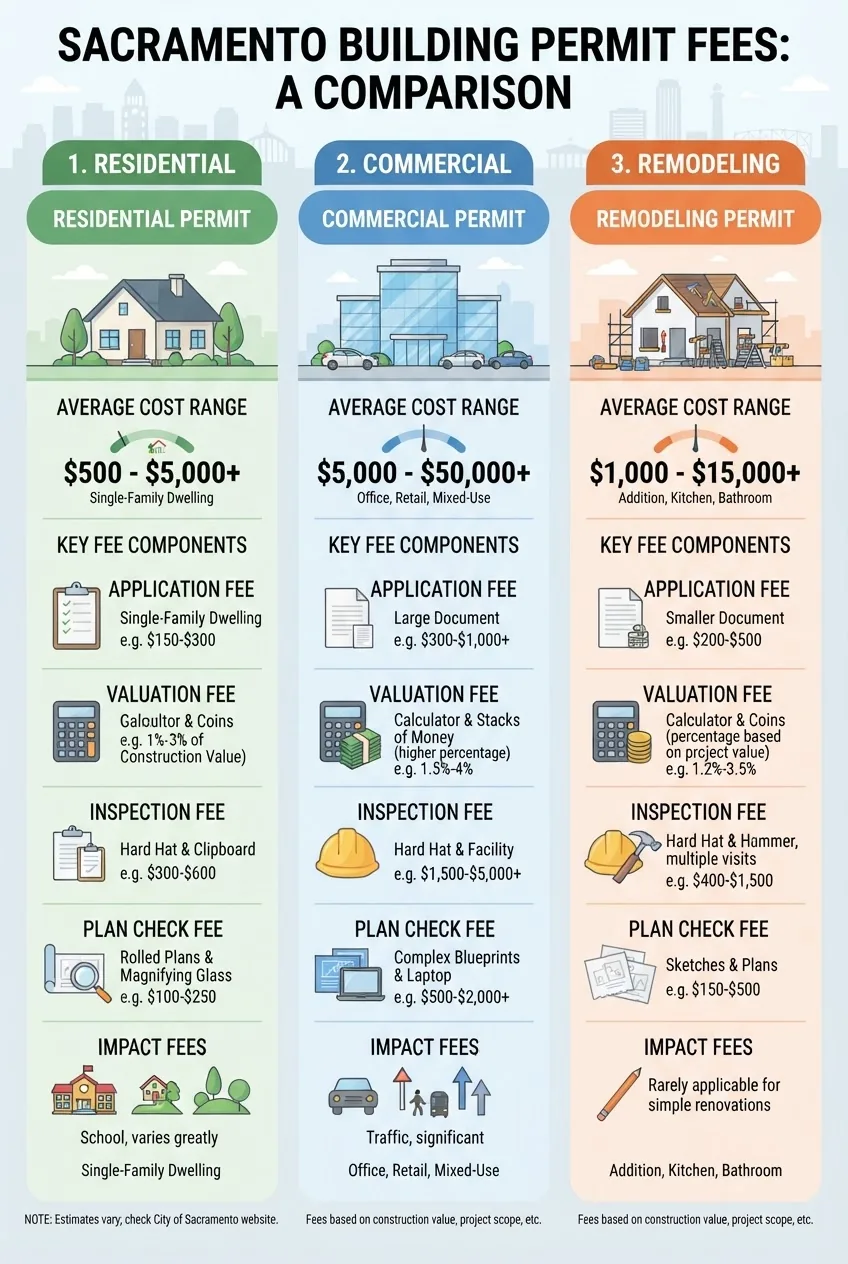
The City’s fee model combines flat application fees, valuation-based fees, plan-check fees, and inspection fees. According to the 2024 City of Sacramento fee schedule, valuation fees account for the bulk of the charge: the higher the declared valuation, the larger the valuation fee tier.
Key fee components explained:
- Application fee — flat intake charge for processing (covers administrative cost of logging and initial review).
- Valuation fee — percentage or tiered fee based on declared project valuation (materials + labor). The City references the International Code Council valuation tables as a baseline.
- Plan-check fee — charged for time spent in plan review; often collected at submittal or billed at first review.
- Inspection fee — per-inspection or bundled; additional re-inspection fees apply for missed inspections or failed calls.
- Impact and utility fees — may apply for new construction or increased occupancy (traffic, sewer connection fees, school fees).
Below is a comparison table of typical cost ranges by permit type. These are illustrative averages; check the official City fee schedule before budgeting.
| Permit Type | Typical Cost Range | Key Fee Components |
|---|---|---|
| Residential (addition/ADU) | $1,200 – $20,000+ | Application, valuation, plan check, inspections, utility/impact fees |
| Remodel (non-structural) | $150 – $3,000 | Flat application, limited plan check, per-inspection fees |
| Commercial Tenant Improvement | $2,500 – $50,000+ | Valuation fees, plan check, fire and accessibility reviews, impact fees |
Fee calculation nuances:
- Valuation audits: Underreporting valuation can lead to adjustments and penalties; Sacramento periodically audits permits against regional valuation tables.
- Re-inspection fees: If an inspector returns and work is not ready, expect an extra $100–$200 per re-inspection (varies by year; check city schedule).
- Fee waivers/discounts: Some permit classes (e.g., certain non-profits or emergency repairs) may qualify for reduced fees; inquire with the Building Division.
Transition: with fees and budgeting understood, the next section explains inspection rules and how to schedule them to pass quickly.
Inspection Requirements and Scheduling for Sacramento Permits
Sacramento inspections validate that work matches approved plans and meets code. Follow this numbered process when preparing for and scheduling inspections.
- Know required inspection stages — Typical stages: footing, foundation, underground utilities/pre-slab, framing, rough MEP, insulation/energy, and final. For complex projects, special inspections (structural steel, special foundations) may be required by CBC Chapter 17.
- Schedule inspections online or by phone — Use the portal to request inspections 48–72 hours ahead. Provide permit number, address, requested time slot, and brief scope (e.g., “framing inspection for 123 Main St. Permit B-2024-1234”).
- Prepare the site — Before inspection: clear access, post approved plans and permit placard, provide ladders or temporary stairs, and ensure required tests (pressure tests for plumbing) are witnessed. Missing documents or blocked access often lead to failed inspections.
- Be ready for corrections — Inspectors will issue correction notices for non-compliance; plan to correct and re-schedule within 7 days to avoid re-inspection fees.
- Use inspector feedback — Ask the inspector for the exact code reference and corrective action to avoid repeating the issue. Sacramento inspectors often reference CBC sections and local amendments in their reports.
Tips for smoother inspections:
- Have a person on site who can discuss the work and point out changes versus plans.
- For electrical: ensure panels are labeled and cleared for access; for plumbing: leave fixtures disconnected for pressure testing as required.
- When in doubt, call the Building Division pre-inspection to confirm expectations for unusual conditions.
Transition: next we cover compliance, penalties, and steps the city takes for unpermitted work.
Compliance, Penalties, and What Happens If You Don’t Get a Permit in Sacramento
Sacramento enforces compliance using administrative citations, stop work orders, penalties, and in extreme cases, civil litigation. According to the 2024 City of Sacramento enforcement guidance, penalties scale by severity and whether work is voluntarily corrected.
Common enforcement actions:
- Stop Work Order — Issued when active construction lacks permits or poses immediate risk; posted on the property and must remain until resolved.
- Administrative Citation — Monetary fines for unpermitted work; repeated violations increase fines and can include daily penalties.
- Mandatory Retroactive Permit — The City can require a full retroactive permit application, including plans and inspections; higher fees and penalties often apply.
- Legal Action — For unsafe conditions or persistent non-compliance, the City can pursue injunctions or civil penalties.
Penalties callout: Typical administrative fines start at several hundred dollars and can escalate to thousands; re-inspection and administrative processing fees are additional. Sacramento may require removal of noncompliant work. (According to a 2024 City of Sacramento publication.)
Common compliance issues and resolution examples:
- Unpermitted room conversions: resolved by submitting plans, paying retroactive fees, and passing inspections; sometimes partial demolition required to expose framing for inspection.
- Electrical work without permit: electrician must apply, pull required permits, and schedule required inspections; the City may require panel upgrades to meet code.
- Historic property exterior changes: require Planning review and possible design review prior to issuing a permit.
Legal and code references: Sacramento enforces the California Building Code as adopted by the City with local amendments. For state-level code citation and updates, see the California Building Standards Commission and for model code references consult the International Code Council.
Transition: next are practical tips drawn from experience to increase your chance of first-time approval.
Tips for a Successful Sacramento Building Permit Approval
- Double-check property lines and setbacks — Confirm with an up-to-date site plan or survey; incorrect setbacks are a common source of denial.
- Label revised sheets clearly — Use revision clouds and a revision table on your cover sheet to help reviewers locate changes quickly.
- Provide accurate valuation — Overly low valuations trigger audits; overinflated valuations increase fees unnecessarily.
- Pre-consult with Planning — For zoning questions or historic district work, get a pre-application meeting to identify conditions early.
- Communicate directly with plan check — Clarify ambiguous comments by referencing specific plan sheet numbers to avoid back-and-forth.
- Bundle related permits — Submitting building plus MEP packages together avoids separate reviews and additional plan-check cycles.
Transition: now practical resources and contact points.
Resources and Contact Information for Sacramento Building Permits
Key local resources to reference when applying:
- City of Sacramento Building Division — permit guides, fee schedules, and online portal links.
- California Building Standards Commission — state code adoption and amendments.
- International Code Council (ICC) — model code references and valuation resources.
- Online permit and inspection portal (linked on the Building Division page) — create an account to start applications and schedule inspections.
Case study (local homeowner): A Sacramento homeowner replacing a 200 sq ft kitchen and upgrading electrical panels submitted a complete package (site plan, floor plan, load calc) and received approval after one plan-check cycle. Total permit fees were $2,400; three inspections (rough, insulation, final) passed on first attempt because the owner pre-arranged a pre-inspection walkthrough with the inspector.
Before you start
- Confirm the permit type and whether Planning approval is required
- Assemble drawings and required reports (structural, soils, energy)
- Create the City portal account and gather contractor license/insurance
- Estimate valuation and prepare payment method
- Plan for 48–72 hour inspection scheduling windows
Step-by-step core procedure
The numbered steps below serve as an operational checklist and guidance for performing each action correctly.
- Document and draw your project — Produce site plan and architectural drawings; call a local surveyor if boundaries are unclear (survey cost typically $600–$1,500 in Sacramento). Label new square footage explicitly.
- Create portal account and start application — Expect 10–20 minutes. Have license and contact info ready. Upload scanned IDs or licenses where required.
- Enter valuation and select fee options — Use contractor quotes or per-square-foot benchmarks ($150–$300/sq ft for residential remodel). Choose expedited review only when schedule-critical.
- Upload PDFs with clear filenames — One consolidated PDF per discipline; cover sheet with index and revision block. Use A-size or scaled PDFs (11×17 preferred for plan clarity).
- Pay and monitor plan check — Pay at submittal and monitor reviewer comments. You’ll receive an itemized list of corrections if any.
- Address comments and resubmit — Create a response letter mapping each comment to sheet changes. Typical turnaround for resubmittal: 5–10 business days during normal workload (longer in peak season).
- Obtain permit and schedule first inspection — Print or display permit; schedule footing inspection 48–72 hours out. Keep permit number handy.
- Complete inspections and get final — Ensure inspectors can access the work and approved plans; pass final to obtain closure.
Common mistakes and how to avoid them
I’ve seen permit applications delayed because of simple, repeatable errors. Below are first-person examples and fixes:
- “I once uploaded a set of plans without a title sheet; the reviewer returned it unread. Fix: always include a cover sheet with project summary and sheet index.”
- “I underestimated valuation to lower fees; the audit forced a retroactive fee and fines. Fix: use multiple contractor quotes and document your basis for valuation.”
- “We scheduled an inspection but the entry gate was locked; inspector left. Fix: ensure site access, post contact number, and have the permit visible.”
- “A contractor failed to supply a licensed electrician’s information; the electrical permit was denied. Fix: verify all trades have active licenses before submission.”
Final checklist before you submit
- Cover sheet with project address, owner, contact, valuation
- Site plan with property lines and setbacks
- Floor plans and elevations with revisions clouded
- Structural calcs or soil report if required
- Energy compliance (Title 24) forms
- Contractor license and insurance documentation
- Payment method and estimated inspection schedule
When to call in a professional
Call a licensed architect or civil/structural engineer when your project includes structural changes, multi-story additions, or complicated site grading. Hire a permit expediter if time-sensitive approval is required; their fees often pay for themselves by reducing review cycles. For electrical or gas work affecting service panels, hire licensed trades to avoid delays or safety hazards.
Internal resources: For a deeper walkthrough of specialized or alternative permit procedures, see these guides:
building application guide for permit requirements and cost
roofing permit process and local building department requirements
steps to getting a permit guide with application requirements
Conclusion
Key takeaways: prepare precise drawings, calculate a defensible valuation, use Sacramento’s online portal accurately, and plan inspections proactively. Expect standard residential submittals to take days to weeks depending on complexity; expedite only when necessary. For updates, consult the City of Sacramento Building Division. Ready to start? Gather your site documents, create your portal account, and submit a complete package to minimize delays.
Next step: If your project involves roofing or specialized trades, review the internal roofing guide linked above or consult a licensed designer to reduce plan-check rounds.