

New Jersey home improvement contractor license search — by the end of this hands-on guide you’ll have verified a contractor’s license, checked renewal and disciplinary records, and documented your results; the full check takes about 20–40 minutes and assumes basic web-navigation skills.
This guide is written for homeowners and property managers who need a clear, step-by-step process to use New Jersey’s official online portals for license verification and consumer protection checks.
Before you start
- Computer or tablet with internet access (desktop recommended) and a modern browser updated within the last 12 months.
- Contractor details: full legal business name, contractor’s personal name, business address, and any license number you already have.
- A place to save or print results: PDF printer or note-taking app to capture screenshots and license details for your records.
- Time: set aside 20–40 minutes to complete the search and to read any disciplinary documents you find.
- Phone number for the New Jersey Division of Consumer Affairs (external contact) in case you need direct clarification.
What Is a New Jersey Home Improvement Contractor License?
A New Jersey home improvement contractor license identifies individuals or businesses legally permitted to perform home improvement work in New Jersey that exceeds minor repairs. The licensing authority for registration, consumer protection guidance, and enforcement is the New Jersey Division of Consumer Affairs (NJDCA). “Home improvement” typically covers remodeling, additions, roofing, siding, window replacement, and similar residential building work when performed for compensation.
Licensing requirements include registration and compliance with consumer protection statutes created to protect homeowners. The license shows the contractor has met statutory registration obligations, supplied required bonding or insurance where applicable, and agreed to adhere to disclosure and contract rules. For statutory language and legal definitions, consult the New Jersey statutes and rule sets governing contractors — these provide the legal backbone for what activities require registration, penalties for unlicensed work, and consumer remedies.
Practically, a registered contractor must provide written contracts for projects over a certain dollar value, disclose their registration number in contract documents and advertising, and maintain records that may be inspected by NJDCA investigators. Comparing how other states operate can clarify expectations; for a comparative view, see California contractors board and certification.
Transitioning to the next section, we’ll explain why you should always verify a contractor’s license before you sign a contract or pay a deposit.
Why Verify a New Jersey Home Improvement Contractor License?

Verifying a contractor’s license is consumer protection at the earliest stage. A license check confirms legal registration, reduces risk of fraud, and provides visibility into complaints or disciplinary actions. According to a 2023 New Jersey Division of Consumer Affairs report, many homeowner disputes involve unlicensed work or contractors with lapses in insurance or registration — verification prevents these common failures from becoming your problem.
Licensed vs. unlicensed contractors: licensed contractors are registered with NJDCA and must follow disclosure rules, while unlicensed contractors may lack required insurance, skip local permits, or be unable to provide legal recourse if work is shoddy. For a comparative workflow on licensing and permits outside New Jersey, review how to obtain licenses and permits.
Examples that show why verification matters:
- Example 1 (anonymized): A homeowner hired a low-bid contractor without a license and later discovered the contractor lacked liability insurance; repairs after a ceiling collapse required out-of-pocket expense. Verifying license and insurance would have flagged the risk.
- Example 2 (anonymized): A contractor listed as “active” in a private directory but was flagged in the NJDCA database for recent disciplinary action; the homeowner used that information to negotiate stronger contract terms and escrow protections.
Verification also informs you about the contractor’s ability to pull permits, meet local code inspections, and the legal remedies available through the NJDCA or courts. Licensing checks are not only about legality — they are about project safety, insurance coverage, and protecting your financial interest. For a sector example outside construction, see the food business application guide that underscores similar licensing and public safety priorities in other industries.
Next, we’ll walk you through the step-by-step process to search and verify a New Jersey home improvement contractor license online using official tools.
How to Perform a New Jersey Home Improvement Contractor License Search and Verification Online

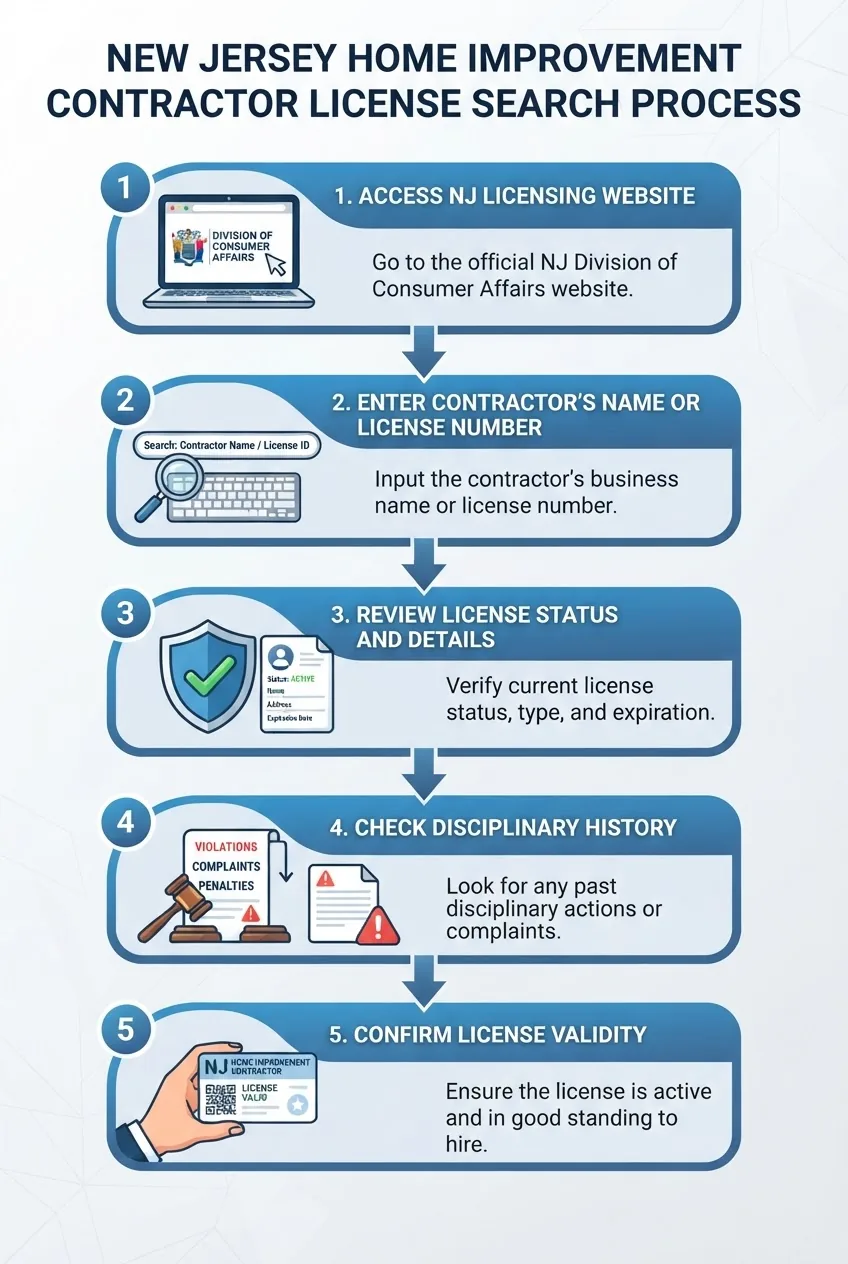
This is the operational core of the guide. Follow each numbered step exactly. Where a step requires a click that might be labeled differently, we describe alternate labels you may see. The pillar resource for extended checks is the contractor license status check and general contractor verification page; see the links below for broader verification scenarios.
-
Open the official NJDCA license verification portal
Open your browser and go to the New Jersey Division of Consumer Affairs official site. The direct portal is usually linked from the NJDCA home page under “Licensee/Registrant Search” or “Verification”. If you are unsure, start at the NJDCA main page: New Jersey Division of Consumer Affairs. Bookmark the verification page for repeat use.
-
Gather and enter the contractor’s identity data
Collect the contractor’s exact business name, the primary contractor’s full name, and any license or registration number provided. Use exact spellings; the NJ lookup is exact-match sensitive in some fields. If you only have a partial name, use the wildcard or “contains” search options if the portal provides them. Common searchable fields include: “Registrant Name”, “Company Name”, “Registration Number”, “City”, and “County”.
-
Search by license or registration number when available
If you have a registration number, enter it first. Numeric or alpha-numeric registration numbers return the most precise results; a number search eliminates ambiguity from common business names. If the portal accepts a number, try both the exact format printed on the contractor’s credentials and the number without spaces or dashes (for example, try both “HI-12345” and “HI12345”).
-
If necessary, broaden the search using alternate fields
When a search by exact name fails, expand your search to city, county, or keywords found in the contractor’s ad. The professional license verification page accepts combinations of inputs—enter fewer constraints to return more matches and then narrow results by cross-checking addresses or trade types.
-
Locate and interpret the registration record
Once the record appears, verify key fields: registrant name, registration/ license number, registration type, issue date, and expiration/renewal date. The record will typically show current status (active, expired, suspended, or revoked). If a “disciplinary actions” or “public actions” section appears, inspect it carefully; it may list warnings, fines, settlement terms, or suspensions with dates.
-
Download or print the verification report
Use the portal’s “Print” or “Save” options to create a PDF. If no PDF option exists, use your browser’s Print -> Save as PDF function and include the page header and URL in the saved file. Record the date and time you ran the search — databases update over time and a saved copy protects you if the record changes later.
-
Cross-check insurance and bonding information
Many registries do not host insurance documents. Ask the contractor for certificate-of-insurance (COI) showing general liability and worker’s compensation coverage and verify expiration dates. If the contractor claims bonding or additional endorsements, request a bond number and issuing surety, then contact the surety company to confirm the bond is active.
-
Check local municipality permits and code compliance
Confirm the contractor’s ability to pull local permits with the municipal building office where the work will occur. Some projects require municipal permits independent of state registration. Municipal permit records also show whether inspections passed or required corrections were filed.
-
Search for complaints and disciplinary records
Use the NJDCA complaint database and public dockets to identify unresolved complaints. If the portal provides links to disciplinary actions, open those documents and note the dates, allegations, and outcomes. For pattern detection, run a name-only search that may list multiple related entities or individuals.
-
Confirm license validity dates and renewal status
Note the issue date and expiration/renewal date. If a license is near expiration (within 30–90 days), ask the contractor for proof of current renewal. Renewals can be delayed in databases; treat a recent renewal claim that’s not reflected online as provisional — request the contractor’s renewal confirmation email or receipt, and consider contacting NJDCA directly.
-
Document discrepancies and follow up with NJDCA when needed
If records conflict with what a contractor provided (different business names, missing registration number, or disciplinary actions), save screenshots and contact NJDCA for confirmation using the contact info on their site. If you find possible fraud, note dates and document communications.
For broader verification scenarios beyond home improvement, see the
contractor license status check and general contractor verification. -
Keep records and include verification in your contract
Attach the downloaded verification report and any COIs to your signed contract. Add a clause stating you verified the contractor’s license and insurance on the recorded date and that final payment is contingent on satisfactory municipal inspections and completion per contract documents.
Also link to the pillar resource for follow-up checks: contractor license status check and general contractor verification.
Understanding the Results of Your License Search
After you’ve run a search, interpreting results correctly is crucial. Below are the typical fields you’ll encounter and what each means for your project.
- License status: Common statuses are “Active”, “Expired”, “Suspended”, or “Revoked”. An active status means registration obligations are currently met; expired indicates the contractor has not renewed; suspended or revoked means the contractor is legally barred from practicing and should not be hired.
- Issue and renewal dates: These show when the license was issued and when it is due for renewal. If the expiration date is within 30 days, confirm renewal documentation before contracting.
- Disciplinary actions and public record: Entries here may list fines, cease-and-desist orders, or conditions of probation. Review dates and outcomes — a resolved matter from many years ago is not the same as an ongoing investigation.
- License classification and scope: Some registrations limit the type of work authorized. Confirm the license covers the work you plan to have done; a home improvement registration may not substitute for trade-specific certifications where required.
- Bonding and insurance notes: If the portal lists bonding or insurance, verify these independently because database entries may lag behind insurer records.
Common scenarios and actions:
- Active with no complaints: Good baseline — still request COIs and references.
- Active with past disciplinary action: Read the disciplinary report; ask the contractor for an explanation and for proof that corrective steps are in place.
- Expired: Do not proceed without proof of renewal. If renewal is recent and not reflected online, request the contractor’s renewal receipt and contact NJDCA if necessary.
- Suspended/revoked: Do not hire — hiring a suspended or revoked registrant risks code violations, permit denials, and personal liability.
Always include the verification date on your contract and save the portal screenshot or PDF. If the database lacks detail or appears out of date, contact NJDCA directly for official confirmation: New Jersey Division of Consumer Affairs. Databases sometimes lag — a delay of several business days is not unusual after renewals or disciplinary updates.
What to Do If You Find an Unlicensed Contractor
If your search shows the contractor is unlicensed, expired, suspended, or revoked, act immediately to protect your project and finances. Below are steps to follow and legal context.
- Stop negotiations or work immediately — Do not provide a deposit beyond statutory limits or allow work to proceed until you receive verifiable proof of current registration and required insurance.
- Document evidence — Save the portal search screenshot, any contract drafts, payment receipts, and correspondence.
- Request proof from the contractor — Ask for registration documents, COI, bonding documentation, and permit numbers. Give a 48–72 hour window to respond with certified documents.
- Contact NJDCA — File a complaint via the official NJDCA complaint form or by telephone. The NJDCA can investigate and may provide advice on refunds and restitution. Use: New Jersey Division of Consumer Affairs.
- Consider a civil claim — If you paid a deposit and the contractor is unlicensed or disappeared, preserve evidence and consult an attorney about recovery using small claims court for amounts within jurisdictional limits or larger civil suits for greater damages.
- Notify your municipality — Unlicensed contractors often skip permits; municipal building departments can place stop-work orders and refuse to approve inspections until compliance is demonstrated.
Legal implications: hiring an unlicensed contractor in New Jersey may void homeowner protections, make you responsible for code violations, and limit ability to recover damages because many licensing schemes are intended to protect consumers by imposing insurance and bonding requirements on contractors.
If you’re unsure whether the problem requires legal action, file a complaint with NJDCA and consult a construction attorney for a risk assessment.
Additional Tips for Hiring Licensed Home Improvement Contractors in New Jersey
Use this checklist of practical due-diligence steps beyond license verification to reduce project risk and improve outcomes.
- Check references and recent work — Ask for three references from projects completed within the last 12–18 months and verify their satisfaction and whether the project was completed on time and within budget.
- Verify business registration — Confirm the contractor is registered as a business entity if they claim so. For guidance, consult our
business registration application guide. - Confirm trade-specific licensure — For specialized trades (electrical, plumbing), ask for appropriate trade licenses. For more on plumbing licensing, see
certified plumbing contractor licensing requirements. - Check insurance certificates — Request COIs showing general liability limits (commonly $1 million per occurrence) and worker’s compensation; verify policy numbers and effective dates with the insurer.
- Use a written contract with clear milestones — Break payments into progress-based milestones tied to inspections. Do not pay more than 10–20% upfront for large projects unless escrow is used.
- Confirm permitting responsibilities — State in the contract who is responsible for pulling permits; require that final payment is conditional on passed municipal inspections.
- Verify legal entity and tax status — For additional protection, confirm whether the contractor operates as an LLC or corporation; this reduces personal liability exposure. For help forming an entity, read
forming a legal entity. For entrepreneurs considering starting a contracting business, see
starting a company in USA. - Watch for red flags — Cash-only offers, high-pressure sales, refusal to provide COIs or a written contract, and requests for full payment upfront are common warning signs.
When you add these checks to your license verification process, you reduce the chance of delays, cost overruns, and legal exposure. If you need broader how-to assistance on registration or permits in other sectors, review our how to obtain licenses and permits and food business application guide.
Common mistakes and how to avoid them
I’ve seen these mistakes in the field. Below I describe what I witnessed and how I fix it.
- Relying on business cards or online ads: I once watched a homeowner hire based on a glossy ad; the contractor’s registration had lapsed. Now I always pull the NJDCA record and request the COI before any deposit.
- Not saving verification screenshots: I had a client whose contractor renewed after a complaint but the portal didn’t update for 10 days. We had saved the pre-renewal screenshot and avoided a payment dispute because we documented the state of the record on the contract date.
- Accepting verbal assurances about permits: I observed a job halted due to missing permits; now I insist proof of permit application numbers and include permit responsibilities in the contract.
- Underestimating insurance limits: A contractor’s COI showed a general liability limit of $100,000 — inadequate for most home renovs. I now verify minimum required coverage of $1,000,000 per occurrence for larger projects.
Checklist: Verify Your Work
| Item | Done |
|---|---|
| Saved NJDCA verification PDF with date/time | [ ] |
| Checked for disciplinary actions | [ ] |
| Verified COI and bond (policy numbers confirmed) | [ ] |
| Confirmed municipal permit procedures | [ ] |
| References checked and recent work confirmed | [ ] |
When to Call in a Professional
Call a construction attorney if you discover revoked/suspended registration and have already paid a deposit or if the contractor refuses to provide COIs. Contact NJDCA immediately for suspected fraud. For complex disputes involving many thousands of dollars or potential liens, a licensed attorney or a claims specialist will help you preserve remedies.
Before closing, remember: databases can lag, statutes change, and specific cases need human review. When in doubt, contact NJDCA or consult legal counsel. For official statutes and broader legal context, see the New Jersey Legislature site: New Jersey State Legislature, and for national consumer guidance visit the Federal Trade Commission: FTC Consumer Advice.
Conclusion: You now have a practical, step-by-step workflow to perform a New Jersey home improvement contractor license search and verification, document results, and act on discrepancies. This process takes about 20–40 minutes per contractor; keep PDFs and COIs with your contract. Start the verification now and protect your project and investment.
Ready to verify a contractor? Begin at the New Jersey Division of Consumer Affairs license lookup and save a dated PDF for your file.