

Quoting software for construction will let you produce accurate residential quotes from site visit to signed agreement; by the end of this guide you’ll be able to select, pilot, and embed an estimating app into your workflow in roughly 2–6 weeks depending on team size. Assumes basic computer skills and familiarity with residential takeoffs and invoicing.
This hands-on guide is written for contractors who need practical, step-by-step direction — not marketing fluff — to move from spreadsheets to a modern estimate software for contractors that integrates with scheduling, compliance checks and mobile quoting. We’ll include a real walkthrough, a mini case study, and exact steps for implementation.
Before you start
- Hardware: smartphone (iOS/Android) and at least one tablet or laptop for admin work.
- Accounts: company email, access to payroll/vendors, and (optional) RSMeans or local pricing subscription.
- Documentation: three recent project quotes, one standard materials list, and certificate copies for insurance/licensing.
- Team: designate one champion for admin training (4–8 hours/week during pilot).
- Access: decision on cloud storage (Google Drive/OneDrive) and any accounting package credentials.
Understanding Quoting Software for Construction
The term contractor quote app covers cloud and mobile tools that automate the quote generation process: takeoffs, time/materials lists, labor calculations, markup rules and client-facing proposal PDFs. These tools aim to reduce human error in bidding, cut turnaround time, and keep historical cost data for future jobs.
Residential contractors face specific estimating challenges: small margins, frequent change orders, and the need to verify subcontractors’ credentials and insurance. Accurate pricing requires combining material unit costs, location-specific labor rates and overhead allocation. Many practical mistakes stem from outdated pricing tables and disjointed communication between the estimator, field crew, and office.
Regulations and compliance affect quoting: software that supports or links to license and insurance checks can save lost bids due to non-compliance. For a primer on using verification as part of bidding, see verifying contractor insurance and licensing.
According to a 2024 industry report, contractors who adopted cloud-based estimating tools reported average quote turnaround improvements of 35% and a 12% reduction in error-related rework—evidence that digital estimate management works when properly implemented (source: industry report summary).

Common types of quoting tools:
- Standalone estimating apps—focus on takeoffs and quote PDFs.
- Construction suites—estimate plus project management, invoicing and scheduling.
- Mobile-first quoting apps—quick on-site pricing and client acceptance tools.
Terminology note: “bidding” refers to submitting a formal price for a project; “estimate accuracy” is typically measured as variance between estimated and actual job cost; “cloud integration” means the app stores and synchronizes data across devices in real time.
Key Features to Look for in Estimate Software for Contractors
- Accurate cost calculation — automatic takeoff-to-cost linkage, customizable labor rates, and region-based material pricing. Look for apps that let you lock markup tiers (e.g., 10%–20%) and adjust overhead by project type.
- Customizable templates — proposal and invoice templates that include line-item breakdowns, change-order sections and local regulatory language. Choose templates you can brand and export to PDF in under 3 minutes.
- Integration with accounting and CRM — two-way sync with QuickBooks Online, Xero or your CRM to push accepted quotes into invoices and retain customer records. Confirm whether sync is batch or real-time.
- Mobile quoting apps — offline-capable mobile apps let estimators capture measurements and issue provisional quotes on-site; verify it supports photo attachments and electronic signatures so you can close a small job same-day.
- Cloud-based collaboration — user roles, audit trails and real-time updating so estimators, PMs and office staff see the same quote versions. Look for revision history with timestamps and user IDs.
- Templates and automation — predefined assemblies (roofing, decks, kitchens) that expand into line items; automation rules to apply labor hours and markup by assembly type. This saves 10–30 minutes per repetitive quote.
- Cost tracking and historical pricing — a materials database and job-cost ledger that stores actual spend to compare against estimates. Good systems let you tag items as CAPEX, direct material, or subcontractor to analyze margins later.
- Change order management — generate and approve change orders that update contract totals and push notifications to field staff. Confirm whether the app requires manual approval or supports digital sign-off.
- Licensing and insurance integrations — API links or built-in checks for verifying subcontractor credentials during bidding, so you don’t award work to unverified parties. This is essential for compliance-aware contractors.
- User interface and ease of use — clean mobile UI, drag-and-drop assemblies, and one-click exports. Prioritize an interface your admin can master in 4–8 hours and estimators in 8–12 hours of practice.
- Security and backups — encrypted data at rest and in transit, role-based access controls, and automated backups with 30–90 day retention policies.
- Pricing models and subscription plans — per-user vs. per-company pricing, tiered features, and overage fees for assemblies or storage. Calculate true cost by adding expected seats and extra integrations.
- Reporting and analytics — dashboards for quote win-rate, average turnaround time, and estimate-to-actual variances. Exportable CSVs let you run deeper analyses in spreadsheets.
- Support and training — onboarding help, live support hours, and knowledge base. Prefer vendors offering role-based training sessions for estimators and office staff.
- Offline and field capability — ability to capture and later sync photos, measurements, and notes when cell service is poor.
Each feature carries trade-offs: deeper functionality increases training time and cost; lightweight apps reduce adoption friction but may require workarounds for compliance. Prioritize the top 5 features your business needs and confirm vendor demos address those use cases directly.
Benefits of Using a Contractor Quote App in Residential Projects
Switching from spreadsheets and paper notes to a dedicated quoting app improves workflow in three measurable ways: faster quote turnaround, fewer errors, and better client communication. For a mid-sized residential contractor, these translate to more closed jobs and higher margins.

Example: during a kitchen remodel estimate, a contractor who used a mobile quote app captured measurements, selected a prebuilt cabinet assembly, and generated a branded PDF while still on-site—closing the client the same day. According to a 2023 productivity study, rapid on-site quoting correlates with a 20–40% higher close rate on residential small projects.
Specific benefits:
- Improved workflow — centralizing templates and historical costs prevents re-keying data and reduces administrative bottlenecks.
- Faster quote turnaround — create and send professional proposals in under 30 minutes for small jobs and under 4 hours for complex remodels.
- Error minimization — automated math, locked markup columns, and mandatory fields reduce omissions that create disputes later.
- Client communication — clear line-item proposals and digital sign-off build trust; attach photos and scope notes to avoid scope creep.
- Cloud-based collaboration — office staff can prepare subcontractor requests while estimators are still on-site, reducing project start delays by days.
Insurance and risk: integrating quoting with your risk management saves you from under-pricing projects that expose you to liabilities. See how coverage affects quoting in our contractor insurance and liability options article for practical rules of thumb on contingency allowances and certificate verification.
Quoting software also helps local competition: faster, professional proposals improve perceived reliability when homeowners search for home contractors near me and compare bids.
How to Choose the Right Quoting Software for Your Contracting Business
Transition: With features and benefits understood, selecting the right tool requires matching capability to business priorities: compliance, team size, and budget. Follow the steps below, and use the comparison table to score your finalists.
- Define top priorities — list 3 non-negotiables (e.g., licensing integrations, QuickBooks sync, mobile offline mode).
- Set a budget — include subscription, setup, training, and integration costs. For most small residential contractors, budget between $50–$250/month for basic-to-mid tiers; larger firms can expect $300–$1,200/month depending on seats and integrations.
- Shortlist vendors — request demos that use your templates and one of your sample projects.
- Pilot with a 2–4 week trial — use two real quotes, track time saved, and collect team feedback.
- Verify compliance features — confirm whether the software helps you verify contractor insurance and licensing requirements or integrates with verification services.
- Score and compare — use a 1–5 rubric for each requirement, then pick the vendor with the highest weighted score.
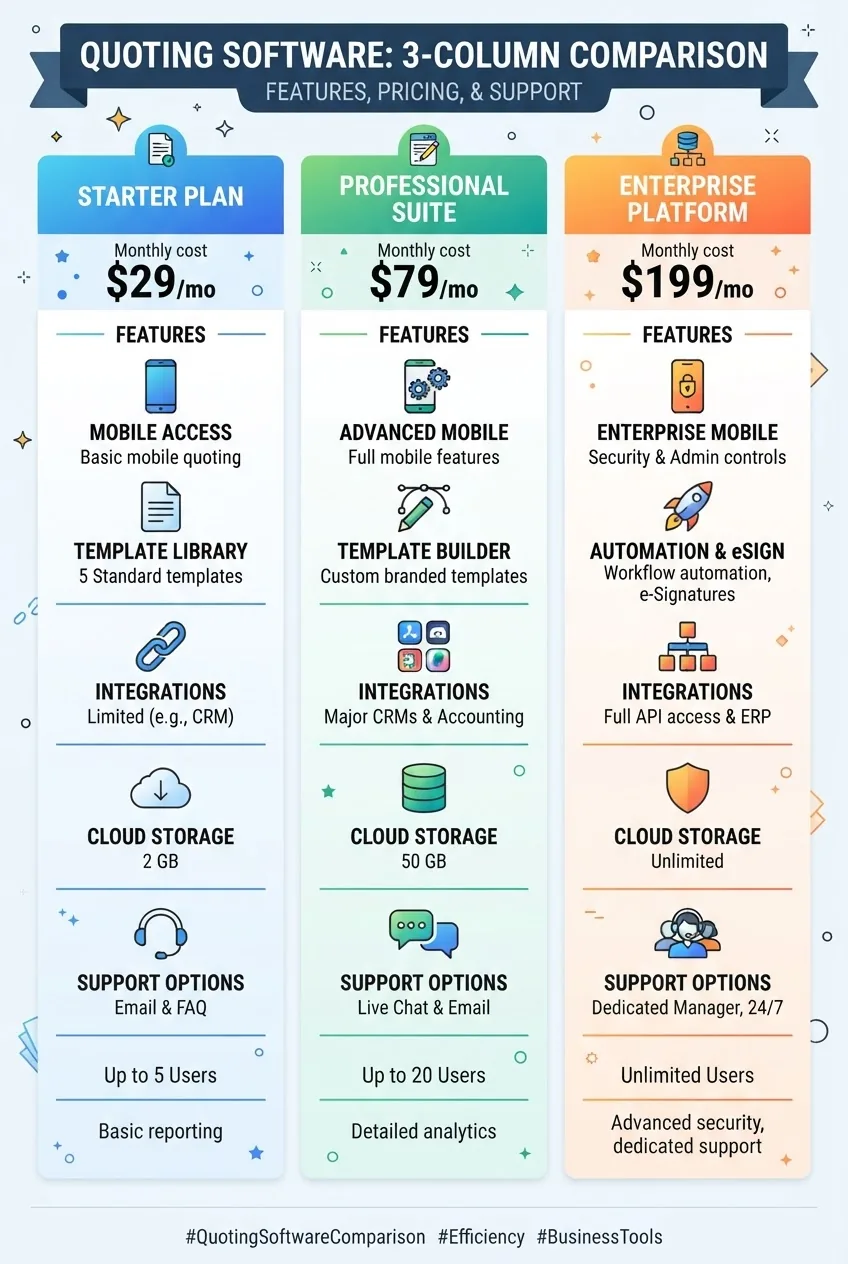
Comparison table (sample scoring):
| Feature / Vendor | Vendor A | Vendor B | Vendor C |
|---|---|---|---|
| Mobile offline capability | 5 | 3 | 4 |
| Accounting integration | 4 | 5 | 3 |
| Licensing / insurance checks | 3 | 4 | 2 |
| Template & automation | 5 | 4 | 4 |
| Monthly cost (est.) | $120 | $220 | $80 |
When assessing vendors, consult regulatory guidance such as OSHA or local state licensing boards to ensure your procedures align with legal requirements. Also reference estimating standards like RSMeans for pricing benchmarks, and recent market analyses from firms such as Forrester for automation trends (according to a 2024 analyst report).
Step-by-Step Guide to Implementing Quoting Software in Your Workflow
Transition: Implementation is where most projects succeed or fail — a clear, staged rollout reduces risk and produces measurable wins quickly. Below are the practical steps I use with contractors to get from selection to live quoting.
-
Step 1 — Prepare baseline data and templates
Duration: 2–4 days. Actions: export three recent quotes from your old system (CSV/PDF), compile a materials list with unit costs (include SKU, supplier, and lead time), and create one standard scope template for a common job (e.g., bathroom remodel). Exact quantities: at least 20 commonly used line items and 5 assemblies.
-
Step 2 — Configure vendor and pricing tables
Duration: 1–3 days. Actions: set regional labor rates (hourly, crew size), add material vendors with current unit costs, and establish markup rules (example: labor 25%, materials 12%, subcontractor markup 6%). If you subscribe to pricing data (RSMeans), import datasets per vendor instructions.
-
Step 3 — Build templates and assemblies
Duration: 2–5 days. Actions: create assembly templates for roof, deck, kitchen, bathroom, and HVAC basics. Each assembly should expand to no more than 12 line items and include default labor hours (e.g., bathroom demo 8 hours, reinstall fixtures 6 hours). Test by creating a sample quote under 30 minutes.
-
Step 4 — Integrate accounting and storage
Duration: 1–2 days. Actions: connect QuickBooks/Xero using API keys, map expense categories to your chart of accounts, and set up cloud backups. Test by creating a quote, accepting it, and confirming an invoice draft appears in accounting.
-
Step 5 — Pilot with live jobs
Duration: 2–4 weeks. Actions: run a 2–4 week pilot using two small and two mid-size projects. Track metrics: time to first proposal, number of revisions, and estimator time per quote. Thresholds: aim to reduce time-to-proposal by at least 25% and maintain estimate-to-actual variance within 10% after one month.
Also during the pilot, practice verifying subcontractor credentials when generating scopes; if your software supports integration, enable automatic checks.
-
Step 6 — Train the team and document workflows
Duration: 1–2 weeks. Actions: run role-based training—2 hours for estimators, 1 hour for office staff, and 30–60 minutes for field supervisors. Create a one-page workflow map showing who approves quotes, who sends invoices, and who handles change orders. Keep a short troubleshooting guide for sync errors.
-
Step 7 — Roll out full adoption and iterate
Duration: ongoing. Actions: move to full adoption after pilot success. Hold weekly check-ins for the first month, measure win-rate and average margin, and refine assemblies and labor rates monthly for the first quarter.
-
Step 8 — Establish maintenance cadence
Duration: quarterly. Actions: update vendor pricing monthly, labor cost adjustments quarterly, and full template review every six months. Keep a change log: date, user, reason, and impact on margins.
-
Step 9 — Connect hiring and subcontractor workflows
Duration: 1–2 weeks integration time. Actions: when quoting requires new subcontractors or trades, link proposals to your hiring pipeline so field managers can trigger pre-hire checks. For help with recruitment tied to projects, see hiring skilled professionals.
Mini case study: A 12-person residential remodeler replaced spreadsheets with an estimating app and, over three months, cut average quote prep time from 7 hours to 3.5 hours, improved close rate by 18%, and reduced change-order disputes by 40% after attaching scope photos to proposals. (Internal client report, 2023)
Common Challenges and Troubleshooting Tips for Contractor Quoting Apps
Transition: Even well-planned rollouts hit snags. Below are common problems and direct fixes based on contractor experience.
- Problem: Syncing issues between app and accounting — Solution: check API token validity, map fields one-by-one, and run a dry sync with a test invoice under $100 to confirm mapping. If discrepancies appear, revert and correct mapping before a full sync.
- Problem: Inaccurate quotes due to stale pricing — Solution: set a monthly calendar reminder to update vendor prices; automate price feeds where possible. If you use RSMeans or a price feed, schedule an auto-import on the 1st of each month.
- Problem: User errors on mobile — Solution: create simplified mobile templates with reduced fields and require photo attachment for scope-critical items to force clarity.
- Problem: Software limitations for complex assemblies — Solution: break large scopes into modular assemblies (max 12 line items each) to keep calculations accurate and auditable.
- Problem: Security concerns for client data — Solution: enable two-factor authentication, limit file downloads, and confirm vendor uses encryption and 90-day backups. For sensitive projects, keep tax IDs and payment details in a separate secured accounting system.
- Problem: Misunderstanding compliance features — Solution: if vendor claims licensing checks, ask for documentation and test with a known-ineligible contractor to confirm matches. For insurance verification context, review our discussion on independent contractor insurance coverage for how coverage affects quotes and risk allowances.
Future Trends in Construction Quoting Software and Automation
Transition: Look ahead to decide whether a vendor’s roadmap aligns with your growth plans.
AI-powered estimating is maturing: machine learning can suggest line-item quantities from photos and standardize assemblies. According to a 2024 analyst report from Forrester, early adopters of AI-assisted takeoff tools saw up to 25% time savings on complex estimates.
Predictive analytics will surface projects with high cost-overrun risk based on historical variance patterns; automation will auto-populate contingencies where variance exceeds thresholds (e.g., add 8% contingency when historical material variance >6%). Expect deeper integration between quoting tools and project planning so estimates feed schedules and procurement automatically.
Mobile optimization and offline-first architecture will be a baseline expectation: contractors will want apps that perform fully offline for at least 6–12 hours of fieldwork before requiring sync. Security and compliance features will also grow—look for built-in certificate-of-insurance scanning and automated expiration alerts linked to bidding workflows.
Finally, ecosystems will matter: vendors who partner with RSMeans-style pricing, accounting platforms, and licensing databases will deliver the most value. According to a 2024 industry report, platform interoperability is the top priority for contractors investing in digital tools.
Common mistakes and how to avoid them
I once recommended a small contractor adopt a feature-rich suite without phasing training; they stalled because estimators were overwhelmed. From experience, the biggest failures come from trying to change everything at once. Start with core templates, pilot on 4 projects, and protect your quoting accuracy by locking critical fields until everyone is trained.
Another mistake I saw: trusting vendor demo data. Always import your own project and price data during a trial — vendor examples rarely match the regional pricing and subcontractor behaviors you face.
Checklist: Verify your quoting software rollout
- Imported 3 sample quotes and 20 common line items.
- Configured vendor pricing and labor rates with monthly update schedule.
- Built 5 assemblies and completed one sample quote in under 30 minutes.
- Completed a 2–4 week pilot with 4 live projects and measured time-to-proposal improvement.
- Connected accounting integration and tested invoice sync end-to-end.
- Enabled two-factor authentication and set backup policy (30+ days).
- Trained estimators, office staff, and field supervisors with documented workflows.
When to call in a professional
If your estimating process involves multi-trade scheduling across dozens of subcontractors, custom estimating engines, or structured contract templates that must meet strict legal constraints, bring in a consultant with construction software implementation experience. For integration with ERP systems or custom APIs, plan for a 4–12 week implementation with a specialist.
Final note: no software removes the need for good estimating discipline. Use software to enforce consistent workflows, measure variance, and continuously refine your assemblies and labor standards.