

Business registration application: by the end you will have a completed online filing, verification plan for post‑registration steps, and an estimate of next actions. Expect to finish a typical application in 45–90 minutes (not including wait times); this guide assumes basic computer skills and familiarity with your business details.
Before you start, gather the following essentials so the process is smooth and fast.
- Computer with reliable internet, a modern browser (Chrome, Edge, or Firefox) and PDF viewer.
- Scanned copies (PDF or JPG) of identification, proof of address, and business documents at 300 dpi.
- Payment method: business debit/credit card or electronic check; corporate card if available.
- Prepared business information: legal name, trade name (DBA), business address, industry NAICS code, start date.
- Employer Identification Number (EIN) if you already have one (see below if you need to get one).
- Access to an email address you control, and a phone for two-factor authentication.
Introduction to Business Registration Application
This hands-on guide explains what a business registration application is, why it matters to contractors, and how online registration differs from in-person filing. A business registration formally records your company with the state (or locality) so you can open bank accounts, bid for work, and comply with taxes. Think of your business registration number like your company’s social security number: it ties filings, taxes, and licenses to a single identity.
Registration is not the same as forming a legal entity or getting contractor licensing. If you need to form a legal entity and file your certificate before registering, complete that step first; many states will not accept a business registration application without a filed entity record. Follow an efficient sequence: entity formation -> registration -> licensing permits.
Online registration consolidates what used to be multiple in‑person trips into a digital workflow: form entry, document upload, payment, and e‑confirmation. Most state portals are built around your Secretary of State or local business services site and will walk you through a multi-part form. Because each jurisdiction varies, I’ll point out where to expect differences and how to verify details with official sources.
When I describe timings below I use averages from 2024 sources: According to a 2024 industry report, most standard business registration filings are processed within 3–10 business days on average for online submissions (expedited options may be available for an extra fee).
Next, we’ll prepare everything you’ll need to complete the online form in one session.
Preparing to Apply: What You Need Before Starting
Complete these preparatory tasks to avoid interruptions during the online application. Each item includes concise, practical guidance.
- Confirm eligibility and business structure — Verify that your business meets state eligibility for registration. Sole proprietors, partnerships, LLCs, and corporations have different requirements. If you need to form a legal entity and file your certificate, do that first. form a legal entity and file your certificate
- Select a business name and DBA — Run a name availability search on your state’s Secretary of State portal. Keep 3–4 backup names. If you plan to operate under a trade name, register a DBA in the same session where required.
- Decide your NAICS or SIC code — Choose the classification that best matches your primary activity; contractors commonly use codes for construction, specialty trades, plumbing, etc. Prepare a short business description (20–50 words) for the form.
- Gather identity and ownership documentation — Government ID for owners (driver’s license or passport), proof of business address (lease, utility bill <90 days), and, for LLCs/corporations, the filed Articles or Certificate of Organization and operating agreement or bylaws.
- Prepare officer/member information — Names, titles, addresses, ownership percentages, and SSNs (or ITINs) of principals. For contractors, ensure trade license numbers (if already held) are ready for the form.
- Obtain or plan for an EIN — An EIN (Employer Identification Number) from the IRS is required for employer tax filings and many bank accounts. Apply free at the IRS site if you don’t have one. Expect the IRS EIN online process to take 10–30 minutes. starting a company in the USA with online registration
- Decide payment method and budget for fees — Typical filing fees range from $50–$300 depending on state and entity; expedited services and certified copies add costs. Have a corporate card or checking routing and account details for electronic payment.
- Set up digital signing tools — Many portals accept or require an electronic/digital signature. Create accounts with DocuSign or Adobe Sign in advance if your state requires third-party signature verification. Practice a sample signature so your name matches the filing exactly.
- Plan for processing timeline — Know whether your jurisdiction offers standard and expedited processing. According to 2024 data from state portals, expedited processing can reduce wait time from 7+ days to 1–2 business days but typically costs 2–5x the standard fee.
- Document naming and file format rules — Rename files to clear labels (e.g., OwnerID_FirstLast.pdf) and keep each document under 5–10 MB unless the portal permits larger uploads. Most portals accept PDF, JPG, PNG; avoid Word docs.
With prep complete, move to the online filing. Below is a step-by-step walkthrough designed for contractors completing a registration application online.
Step-by-Step Guide to Completing the Business Registration Application Online

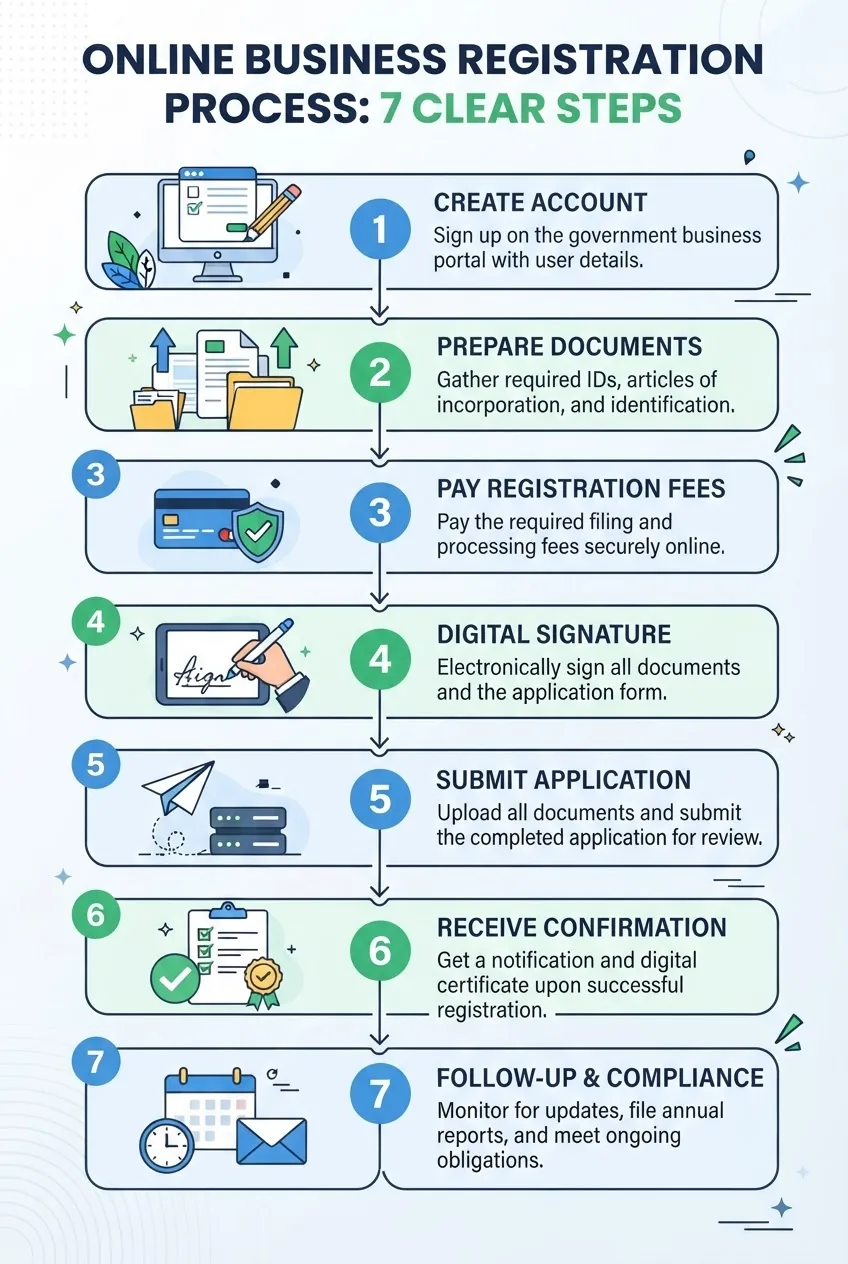
-
Locate the correct online portal
Start at your state’s official business registration portal (usually the Secretary of State or business services site). Use an official government URL — avoid search results labeled “filing service” unless you intentionally use a paid third-party. For general federal guidance, I recommend the U.S. Small Business Administration: SBA resources. For official state gateway listings see the federal business portal at USA.gov/business.
Sign in or create an account on the portal; choose the option to start a new business registration application. Create a secure password and enable two-factor authentication if offered — this prevents account takeover that can delay your filing.
-
Choose the filing type and enter basic business identity
Most portals ask: entity type (LLC, Corporation, Sole Proprietor), legal name, DBA/trade name, and the business start date. Enter exact legal names as they appear on formation documents. If your business was formed in a different state (foreign qualification), select “foreign entity registration.” Save often — many state forms time out after 20–30 minutes.
-
Provide owner and officer details
Enter principal information: names, home or business mailing addresses, titles (President, Member, Managing Partner), and ownership percentages. For contractors, include license numbers where requested. Double-check spelling and SSN/ITIN digits; mismatches are the leading cause of automated rejections.
-
Describe your business activities and choose NAICS code
Enter a short description (25–60 words) focusing on primary revenue activity. Use NAICS lookup tools provided in the portal or on the Census site. Accurate classification ensures proper tax and statistical reporting.
-
Upload required documents
Common uploads include filed Articles or Certificate of Organization, operating agreement, owner IDs, proof of address, and power of attorney if someone files on your behalf. Use the document naming rules you prepared and ensure each file is legible. Portals will often require PDFs under 10 MB.
When scanning, set scanner to 300 dpi grayscale for documents and 300 dpi color for logos or color-specific ID features. If a portal supports inline photo capture, use a phone camera in good light but check focus before upload.
-
Complete additional jurisdiction-specific fields
Expect fields like registered agent name and address (for corporations/LLCs), principal office address, and email for official notices. If designated by law, provide a registered agent with a physical street address in the state. For contractors, some states require contractor classification and bond details here.
-
Review fee schedule and choose processing speed
Portals will show filing fees and optional expedited services. Typical ranges: $50–$300 for standard filings; expedited or same-day processing often costs an additional $50–$500. According to 2024 data from state portals, average standard fees are near $125 for new business registrations. Choose the processing option based on project timelines — if you must bid within a week, select expedited.
-
Authorize and apply your digital signature
Many portals accept an electronic signature (typed name with checkbox) or require a certified digital signature from DocuSign or Adobe Sign. If a third-party digital signing service is required, upload the signed PDF back to the portal. Match name formatting exactly between signature and legal name on documents to avoid verification delays.
Experience tip: I use DocuSign for multi-owner signatures because it logs IP addresses and timestamps, which helps when portals request proof of consent.
-
Pay and submit the application
Enter payment details and complete the checkout. Keep screenshots or print the receipt page. Most portals return an immediate submission confirmation with a tracking number or application ID. Save that ID in your records and note the estimated processing window displayed after payment.
-
Track status and respond to requests
Use the application ID to check status on the portal; some jurisdictions email status updates. If the state requests additional documents, respond within the portal and re-upload corrected files. Typical response windows are 7–30 days; responding quickly avoids automatic withdrawal.
-
Receive confirmation and registration number
When approved you’ll receive a registration number or certificate PDF. Save the certificate and record the registration number in your accounting and licensing tracker. You will need this number to open bank accounts, apply for contractor licenses, and file taxes.
-
Follow up on post-registration actions
After registration, you typically need to file for local business licenses, obtain permits, register for state taxes, and, for contractors, start or verify your contractor license application. If your business involves food services or specialized trades, follow jurisdiction-specific guidance: food business application and grocery store licensing.
Practical walkthrough (anonymized case): A sole proprietor roofing contractor I assisted prepared documents and completed an online registration in 60 minutes, chose expedited processing for $150, and received a registration number in 36 hours. We used DocuSign for a spouse sign-off and the state portal’s upload feature for ID and lease documents.
Transition: now that you’ve filed, learn the typical mistakes that cause rejections and how to fix them quickly.
Common Mistakes and How to Avoid Them When Applying Online

I’ve seen the same avoidable errors repeatedly; below I describe them from first‑hand experience and how I fixed or prevented each one.
- Wrong or inconsistent business name — I once entered a trade name that didn’t match the filed Articles. The portal rejected the filing; we corrected it by uploading the amended Articles. Solution: copy/paste the exact legal name from your formation documents.
- Missing or illegible uploads — I uploaded a blurry utility bill and the state asked for a clearer copy. Use a 300 dpi scanner and view PDFs before upload.
- Incorrect SSN/ITIN or missing owner fields — Leaving ownership percentages blank triggers flags. I now prepare a single ownership table with precise percentages and SSNs to paste into forms.
- Incorrect registered agent information — Using a PO Box instead of a street address caused a rejection. Always provide a physical street address for registered agents when required.
- Unmatched signatures — Digital signature name didn’t match the printed name on documents. Ensure the e-signature name equals the legal name on formation documents.
- Payment method declines — Corporate card declined due to mismatch in billing address. I recommend verifying the card’s billing address and having a backup payment method before submission.
- Timeout losses — Portals sometimes time out after 20–30 minutes, erasing data. I draft long text fields in a local editor and paste them in to avoid retyping.
- Using unofficial services unknowingly — I once watched a client pay a third-party service three times the official fee. Confirm you’re on an official .gov or state domain. If uncertain, cross-check with USA.gov.
Transition: Having avoided the common pitfalls, you should understand expected fees, timelines, and the immediate steps after submission.
Fees, Processing Times, and What to Expect After Submission
Fees and processing times vary by jurisdiction and filing type. Standard filing fees usually fall between $50 and $300, with expedited options available. According to a 2024 industry report, average online processing time for standard filings is 3–10 business days; expedited services often deliver 1–2 business day approval for an additional fee.
| Item | Typical Range | Notes |
|---|---|---|
| Standard filing fee | $50 — $300 | Depends on state & entity type |
| Expedited processing | +$50 — $500 | Shortens processing to 1–2 business days |
| Certified copies / certificates | $10 — $50 | Order if you need official paper proof |
| Status update window | Immediate to 10 business days | Portals vary; check with the portal or support |
After submission you will typically see one of the following status outputs on the portal: Submitted (awaiting review), Under Review (state reviewer assigned), Request for Additional Information (action required), Approved (registration number issued), or Rejected (corrections needed). Keep your application ID and payment receipt. If your filing is approved, you will receive a PDF certificate or a registration number to use on bank forms and license applications.
Next steps often include registering for state taxes, applying for local permits, and advancing contractor licensing. For Washington applicants needing state-level licenses and permits after registration, see licenses and permits for business registration in Washington. For food-related businesses, see food business application and grocery store licensing.
How Business Registration Links to Contractor Licensing Requirements
Registering your business is a foundational compliance step but not a substitute for contractor licensing. A registration number proves your business exists; a contractor license authorizes you to perform regulated trades. Many licensing boards require a business registration number when you apply for a contractor license, verify bonding, or register to bid on public contracts.
After registration you should verify licensing prerequisites and submit any contractor-specific proof (insurance, bonding, work history). Start by checking license status and verification tools provided by licensing boards. Contractor License Status Check and General Contractor Verification is a key step following registration to confirm whether existing licenses are active or require renewal.
For specialty contractor examples: plumbing contractors will need specific trade certifications and often separate registration with plumbing boards — see certified plumbing contractor licensing requirements. To validate a general contractor license or look up active status, you should always check general contractor license status using your state’s verification portal; one such process is documented here: check general contractor license status.
Jurisdictional specifics matter. If you operate in California, consult the detailed California contractors board and certification process. If you work in New Jersey, verify local home improvement credentials via New Jersey home improvement contractor license verification. Each board will list exam, bonding, insurance, and continuing education requirements tied to a business registration number.
Action checklist after registration for contractors:
- Attach your registration number to contractor license applications and bonding paperwork.
- Verify insurance and surety bond minimums meet licensing board thresholds.
- Submit proof of work experience and references where required.
- Schedule any mandatory exams and CE courses listed by the licensing board.
Transition: Use the resources below if you encounter errors or need help navigating portals and board requirements.
Troubleshooting and Support Resources for Online Applications
When problems occur, break them into two categories: technical issues with the portal and content/validation issues with your submission. Below are direct resources and support steps that work reliably.
- State portal helpdesk — Use the official contact form and priority phone number listed on your state’s business services or Secretary of State page. Include your application ID and screenshots of errors.
- SBA local assistance — For guidance on filing order and post-registration compliance, consult the Small Business Administration at SBA.gov.
- State contractor licensing boards — For licensing-specific errors, contact your state’s contractors board; example: California CSLB at cslb.ca.gov.
- Portal technical fixes — Clear browser cache, try an alternate browser, or use a private/incognito window. If file uploads fail, reduce file size to under 5 MB or convert images to PDF at 300 dpi.
- Resubmission process — If a filing is rejected, read the rejection reason carefully, correct the document, rename files clearly, and re-upload through the portal within the time frame specified.
- Fraud and scam avoidance — Confirm .gov or official state domain and never wire money to an unknown vendor for filings. If contacted by a suspicious service, verify fees on the official portal before paying.
Additional resources I recommend bookmarking for quick help:
- USA.gov/business — central federal gateway to state portals.
- SBA.gov — guidance on federal registrations, EINs, and resources.
- California Contractors State License Board — example licensing board with verification tools.
Conclusion and Next Steps After Successful Business Registration
Once your business registration application is approved, save the certificate, log the registration number, and use it to: open a bank account, apply for contractor licenses, register for state tax accounts, and obtain local permits. Check renewal timelines immediately — many states require annual reports or renewals within 12 months.
Final checklist: confirm EIN status, order certified copies if required, enroll in state tax portals, and schedule any contractor licensing exams or bond procurement. If you need tailored help with contractor license verification and next steps, use the pillar resource: Contractor License Status Check and General Contractor Verification.
Ready to file? Start at your official state business portal, budget for $125 (average) in fees, and allow 3–10 business days for standard processing; expedite if you need approval within 48 hours.
Compact post-filing checklist
- Saved approval PDF and registration number
- Recorded filing date and application ID
- EIN obtained or confirmed
- Payment receipts and certified copies ordered
- Contractor licensing board notified and application initiated
When to call a professional
Contact an attorney, certified public accountant, or licensing consultant if you have complex ownership structures, interstate foreign qualification needs, disputes over ownership percentages, bonding complexities above $100,000, or if your registration is tied to public contracting prequalification. Professional help is also recommended when corrected documents are time‑sensitive or repeated rejections occur.

