

By the end of this guide you will have a curated list of trusted online resources, a vetted process to choose reliable home repair websites, and a step-by-step plan to integrate digital tools into yearly and monthly maintenance. Expect a realistic completion time of 3–5 hours to set up accounts, compare tools, and build an initial maintenance schedule; the skill level required is homeowner-to-intermediate: basic web literacy, a smartphone, and familiarity with simple home tasks.
- Device with internet access (desktop or smartphone)
- User accounts for marketplaces or apps you plan to test (email, payment method)
- Photos or notes about your home systems (HVAC, roof, appliances)
- List of priorities: safety, seasonal care, budget limits
- Basic tools: tape measure, camera/phone, flashlight, pen and paper
Follow the numbered steps below as your hands-on workflow. Each step opens with the immediate action you should take and includes checklists, examples, and resource links so you can act as you read.
-
Get oriented: Introduction to Home Improvement Online Resources
Introduction to Home Improvement Online Resources
Start with the basics: a central list of the places you can go for help. Think of home improvement online resources as a librarian for your home—digital directories, tutorial libraries, contractor marketplaces, and planning tools all serving specific roles. This section maps that ecosystem and explains how to use each node effectively.
Online home improvement tools and digital repair resources fall into predictable categories: research and tutorials, purchasing and delivery, scheduling and maintenance, and professional bookings. For each category you should ask three pragmatic questions: what problem does it solve, how does the site show reliability, and how will it integrate with my calendar and budget?
Practical starting checklist (do these first):
- Create a dedicated email and password manager entry for your home maintenance accounts.
- Collect serial numbers and model names for major systems (water heater, HVAC) and keep them in one folder for reference when searching repair guides or parts.
- Reserve 30–60 minutes to test one tutorial platform and one contractor marketplace so you know the booking and refund flows.
For new homeowners, start with targeted starter resources such as home maintenance tips for new homeowners to avoid common early mistakes.

-
Catalog the platforms: Types of Home Improvement Online Platforms
Types of Home Improvement Online Platforms
Knowing platform types helps you route tasks to the right service quickly. Below is a categorized descriptive list that clarifies each platform’s role, best use cases, and typical trust signals.
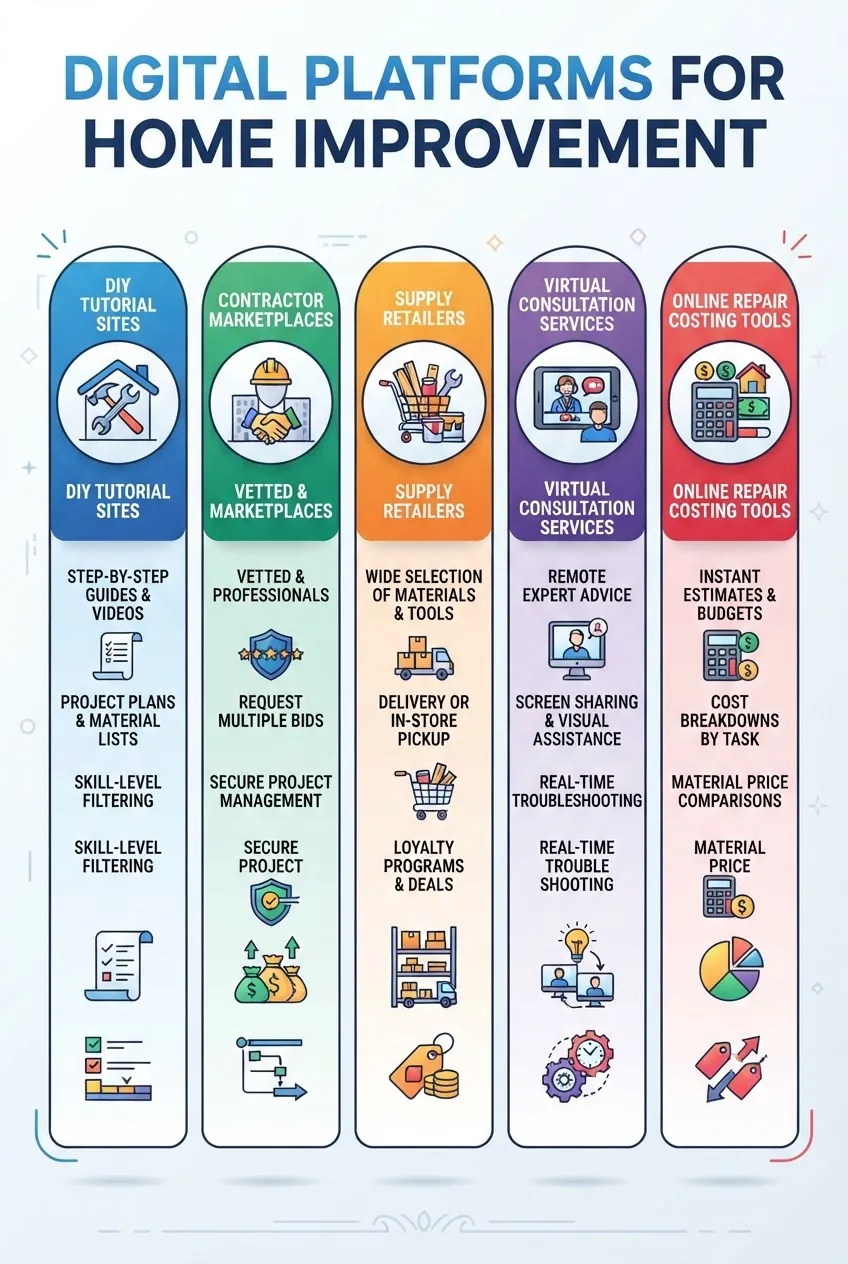
- DIY tutorial platforms — Step-by-step guides and repair videos for homeowners. Best when jobs are low-risk (caulking, painting, simple fixture swaps). Look for progressive difficulty levels, parts lists, and time estimates (e.g., “30–90 minutes”). Use the DIY home repair projects guide for project ideas and realistic time budgets.
- Contractor marketplaces — Platforms connecting you to local professionals for services beyond DIY scope. Strengths: instant quotes, scheduling, and user reviews. Typical trade-offs: service fees and variable vetting rigor. Use these for licensed trades like electrical and roofing.
- Tool and material suppliers (online retailers) — Rapid comparison of material prices and delivery windows. Prioritize sites with clear return policies, part compatibility filters (model lookup), and bulk-buy discounts for maintenance projects.
- Virtual consultation services — Live video guidance from experts for diagnostics, second opinions, and pre-visit troubleshooting. Useful to avoid unnecessary service calls; note limitations for hands-on repairs or safety-critical diagnoses.
- Repair cost estimators and planning tools — Instant calculators that convert a symptom or project into a budget range. Use them for planning and negotiating with contractors; compare several estimators to triangulate realistic costs.
When selecting platforms, map them to your maintenance workflow: research (tutorials), buy (retailers), schedule (apps/marketplaces), and track (maintenance planners).
For hands-on project inspiration and step-by-step examples, consult the DIY home repair projects guide.
-
Vet thoroughly: How to Evaluate and Choose Reliable Home Repair Websites
How to Evaluate and Choose Reliable Home Repair Websites
Digital vetting is a repeatable process. Use the checklist below to compare candidate home repair website options and reduce risk before you click “book” or buy parts.
Before the steps: compile at least three candidate sites for each need (tutorial, parts, pro booking) to compare trust signals side-by-side.
- Step 1 — Check credentials and certifications
- Look for contractor licensing details or partnerships with verified trade associations.
- Cross-check contractor claims with authoritative bodies like HUD building safety guidelines for code references.
- Association badges (for example from National Association of Home Builders) add credibility when properly linked to the certifying organisation.
- Step 2 — Inspect user reviews and ratings systems
- Prefer platforms that provide verified customer reviews tied to completed jobs and allow providers to respond to feedback.
- Watch out for patterns: many one-line 5-star reviews without photos or dates suggest possible manipulation.
- Step 3 — Confirm security and refund policies
- Ensure the site uses HTTPS and displays clear payment protection, cancellation, and refund terms.
- Consumer protection resources such as Better Business Bureau can show complaint histories.
- Step 4 — Look at update frequency and content quality
- High-quality tutorial platforms publish updates, version histories, and user corrections; active moderation of user content reduces misinformation risks.
- Step 5 — Validate safety and compliance guidance
- Sites that cite building codes, safety thresholds (e.g., GFCI distance, ladder angles), and manufacturer instructions demonstrate higher authority.
- For complex systems, combine online advice with local code consultation or licensed pro confirmation.
- Step 6 — Test responsiveness and support
- Contact customer support with a simple question and measure response time (under 24 hours is acceptable; same-day is preferable for urgent repairs).
Practical examples and quick checks I use:
- Search the contractor name + “license” and confirm the number on the local regulator’s site (I give this 5–10 minutes per provider).
- Run two cost estimators to compare pricing ranges—if a contractor’s quote is 50% outside that window, ask for line-item justification.
- Save screenshots of reviews and chat threads in case of disputes.
For inspection and standards reference when choosing resources, consult the healthy homes assessment checklist to align online advice with local safety expectations.
If you’re preparing a sale and deciding which items to prioritize, see the guide on what to repair before selling a home for prioritisation strategies.
Trust signal disclaimer: online resource reliability varies by platform and region; always verify local regulations and contractor credentials before permitting work.
According to a 2024 industry report, homeowners using marketplaces reported faster average booking times (24–72 hours) compared with traditional phone-based scheduling; use this as an efficiency baseline for comparison.
- Step 1 — Check credentials and certifications
-
Prioritize functionality: Essential Features to Look for in Home Improvement Pages
Essential Features to Look for in Home Improvement Pages
When evaluating home improvement pages, prioritize interactive and support-focused features that save time and reduce mistakes. Below are the most valuable features, explained and ranked.
- Interactive checklists — A dynamic checklist that you can tick off, save, and export is worth more than static lists. Look for export options (CSV, PDF) and calendar sync so tasks become scheduled reminders.
- Cost calculators / repair cost estimators — Transparent cost breakdowns (labor, parts, travel) with regional price adjustments help set realistic budgets. Prefer calculators that show a confidence range and cite data sources.
- Instruction videos and step-by-step articles — Videos with timestamps, parts lists, and clear difficulty ratings reduce the risk of misapplied advice. Prioritize videos that show safety gear and code considerations.
- Scheduling and booking tools — Integrated calendars, live availability, and upfront pricing make bookings efficient. Platforms that allow rescheduling without penalty (within a stated window) protect you from sudden charges.
- Customer support options — Multi-channel support (chat, email, phone) with SLA expectations listed (e.g., “response within 24 hours”) builds trust. Confirm whether the support team can escalate to technical staff for complex queries.
- Parts lookup and model-matching — Material suppliers that let you enter a model number and receive compatible parts reduce returns and mismatches; require part compatibility confirmation before checkout.
- Verified user reviews and photo evidence — Reviews should be tied to confirmed jobs and include photos or receipts; this reduces the risk of fake feedback influencing your decisions.
- Downloadable templates and printable checklists — If you prefer offline planning, sites that offer ready-to-print templates are practical. For cleaning-focused tasks, check the printable home cleaning checklist templates.
- Mobile-friendly design and app integration — Mobile responsiveness, push reminders, and calendar integration (Google/Apple) are must-haves for homeowners who manage tasks on the go.
- Transparency in policies — Clear warranties, cancellation, and refund terms protect both homeowner and provider. Sites listing labor and parts warranties with durations (e.g., 90-day labor warranty, 12-month parts warranty) are preferable.
Trade-offs to consider: extensive automation (e.g., auto-booking) saves time but may reduce your control over scheduling details; evaluate whether convenience or manual oversight is more important for each task.
-
Compare and choose: Popular Online Tools and Apps for Home Maintenance Planning
Popular Online Tools and Apps for Home Maintenance Planning
Maintenance planning succeeds when tools reduce friction: scheduling, reminders, shared household access, and inventory management. Compare the leading apps using the table below to see strengths and use cases.

App / Platform Core features Best for Cost HomeCare Planner Custom maintenance calendar, reminders, inventory lists Families managing seasonal upkeep Free tier; premium $3.99/mo FixQuote Cost estimators, contractor quotes, booking Homeowners hiring pros No subscription; small booking fee TaskShare Shared checklists, task assignment, photo logs Shared households or landlords $1.99/mo per user QuickSchedule Calendar sync, provider messaging, invoicing Users who hire regular services Free for basic; business tier $9.99/mo Notes on selection and integration:
- Choose an app that supports calendar integration (Google or Apple) and push reminders for recurring tasks.
- Export/backup: select tools that let you export schedules as CSV or PDF to keep offline copies.
- Shared access: if multiple household members manage tasks, prefer apps with role-based permissions.
Use the following resources to pair apps with projects and templates: view curated ideas at home maintenance projects for easier upkeep for project scheduling examples, and download a reusable maintenance schedule template and program guide to import into many apps.
For deeper app reviews see top home maintenance apps.
-
Curate sources: Recommended Home Repair Websites and Resource Platforms
Recommended Home Repair Websites and Resource Platforms
Below is a curated list of categories and representative platforms. Each entry includes a short description and a practical strength so you can pick the right resource quickly.
- DIY tutorial hubs — Platforms with structured video series and timestamped steps. Strength: step-by-step clarity; weakness: may omit local code variations. Useful picks: major tutorial networks and specialist renovation blogs.
- Repair forums and community Q&A — Peer-to-peer help with model-specific troubleshooting. Strength: crowd knowledge and niche solutions; weakness: variable accuracy—cross-verify with manufacturer guidance.
- Video repair guides — Trusted channels with demonstrable credentials (licensed plumbers, electricians). Strength: visual learning; weakness: difficult to verify every claim—prioritize those that cite standards.
- Contractor and handyman marketplaces — Local booking with reviews and insured providers. Strength: convenience and accountability; weakness: service fees and variable vetting depth.
- Tool and material retailers — Online catalogs with model-matching and same-day delivery in some regions. Strength: fast parts sourcing; weakness: returns can be tedious for custom parts.
- Seasonal home improvement websites — Curated seasonal checklists and sale alerts. Strength: timely reminders; weakness: sometimes marketing-heavy—filter content for actionable items.
- Safety and compliance resources online — Government and association pages that summarize code and safety thresholds. Strength: authoritative guidance; weakness: written in formal language—pair with practical tutorials for execution.
- Printable and downloadable templates — Cleaning and maintenance checklists for low-tech households. Find targeted downloads like printable home cleaning checklist templates and a detailed deep cleaning house checklist.
- Problem-specific resource lists — Compilations that map common issues to likely causes and solutions; pairing these lists with trusted vendors shortens repair time. See common home maintenance problems list and repair solutions for more.
Real-world mini case study: I recently used a marketplace to book an emergency water-heater service. Process: compare 3 quotes, confirm license and insurance, schedule earliest slot, and request photo of completed work. Time from posting to finished repair: 36 hours. Lessons: save key photos, confirm warranties, and keep payment documentation.
If your goal includes focused cleaning or seasonal deep work, pair platform guidance with the detailed deep cleaning house checklist and printable templates referenced above to cover both maintenance and hygiene.
-
Coordinate bookings: How to Use Online Resources to Coordinate with Local Contractors and Handyman Services
How to Use Online Resources to Coordinate with Local Contractors and Handyman Services
Coordinating online requires clear steps: define scope, gather quotes, vet, and schedule. The workflow below converts websites and marketplaces into predictable outcomes.
- Define the scope precisely — Write a one-paragraph description with photos and measurements. Include model numbers for parts and the desired outcome (repair, replace, or inspection).
- Request 3 written quotes — Post your scope on two marketplaces and ask a neighborhood contractor for a third quote. Compare line items (labor vs. parts) and travel fees.
- Vetting and verification — Check license numbers, read recent reviews, and request proof of insurance. If you want structured inspection guidance, consult the comprehensive maintenance inspection checklist for building care before booking.
- Use online booking and scheduling tools — Prefer platforms that display provider availability and let you attach images and documents when scheduling.
- Agree on deliverables and warranty — Add a short written agreement to the booking (email suffices): scope, price, parts included, start time, cleanup expectations, and warranty window (e.g., 90 days labor).
- Manage payment and dispute protection — Use platform escrow or credit-card holds if available; avoid upfront full cash payments for larger jobs.
- Collect completion evidence — Ask the contractor to upload before/after photos and an invoice to the platform; save those to your maintenance app for future reference.
Tip: For recurring small tasks consider subscription services—compare offerings in affordable handyman subscription services and repair packages to weigh cost predictability versus on-demand booking.
Personal walkthrough: I booked a handyman through a marketplace for two hours of work. Booking flow: 1) create project with photos (5 minutes), 2) receive two quotes (6 hours), 3) choose provider and schedule (2 minutes), 4) confirm payment via escrow (instant). The provider uploaded photos and a short invoice; the platform held funds until job completion. This flow minimized disagreement and streamlined a warranty claim later.
-
Formalize integration: Integrating Online Resources with Your Yearly and Monthly Home Maintenance Plan
Integrating Online Resources with Your Yearly and Monthly Home Maintenance Plan
Turn ad-hoc fixes into a proactive regimen by integrating tools and resources into a repeatable schedule. Use the online tools you’ve chosen to automate reminders, track warranties, and centralise vendor contacts.
Start by下载 or referencing the complete home maintenance checklist for yearly and monthly care to map tasks to seasons and months.
Example integration steps:
- Import checklist into your app — Use a maintenance app that accepts CSV or manual entry. Assign each task a recurrence: monthly, quarterly, biannual, or annual. Example: HVAC filter change = monthly; gutter clean = biannual (spring/fall).
- Attach resources — Link the relevant tutorial, parts page, or contractor profile to each task. For instance, attach a parts retailer link for HVAC filters and a tutorial video for filter replacement procedures.
- Set reminders and escalation paths — Primary reminder (push notification 7 days before), secondary reminder (email 2 days before), and escalation to a contractor if not completed 3 days after due date.
- Record outcomes — After each task, upload before/after photos, invoices, and warranty info in the app so future issues have context.
- Quarterly review — Every 3 months, review the schedule and costs. Adjust task frequency based on observed wear or manufacturer guidance.
For detailed inspection planning pair this with a comprehensive maintenance inspection checklist for building care and when you need a printable quick-reference use the monthly home maintenance checklist PDF guide.
Concrete scheduling examples (timings and thresholds):
- Change HVAC filter: every 30 days (every 60 days for lower dust households) — set 5-day advance reminders.
- Test smoke/CO detectors: monthly checks, battery replacement annually unless sealed 10-year battery.
- Gutter inspection: within 48 hours after major storm and biannually in spring and fall.
- Water heater inspection: visual check quarterly; flush annually if sediment buildup or manufacturer’s guidance indicates.
When you import the checklist discussed above you will convert reactive repairs into scheduled tasks and keep supporting evidence centralized for resale, warranty claims, or professional inspections.
-
Plan ahead: Future Trends in Home Improvement Online Resources
Future Trends in Home Improvement Online Resources
Expect the next five years to bring tighter integration between smart-home data and maintenance platforms. Trends to watch:
- AI-powered diagnostics — Tools that infer repair needs from photos and sensor logs and produce prioritized action lists.
- Augmented reality (AR) guides — Overlay instructions on your real-world view so you don’t lose your place during disassembly or reassembly.
- Virtual inspections — Licensed pros performing live, remote inspections to triage issues before in-person visits.
- IoT integration — Appliances reporting maintenance windows directly to your planner app and auto-ordering consumables.
- Marketplace consolidation — Platforms bundling parts, booking, and warranty into single purchase flows.
Projected effect: according to a 2024 industry forecast, increased automation will lower small repair costs by an estimated 10–18% for homeowners who adopt integrated monitoring and scheduling tools.
Common mistakes and how to avoid them
I once booked a contractor without verifying the license number and later discovered the provider wasn’t registered in my state; that cost an extra inspection and a rework. Now I always verify license numbers on the regulator site and take screenshots. I also used free DIY videos for electrical repairs beyond my comfort zone—don’t. If a project involves hidden-wire or load-bearing changes, stop and consult a licensed pro.
I have also fallen for low initial quotes where parts were excluded; I now demand itemized quotes and confirm whether parts come with manufacturer warranties and return policies.
Compact verification checklist
- Account set up with saved logins and payment method
- Top 3 resources bookmarked for tutorials, parts, and contractors
- Imported yearly/monthly checklist into a maintenance app with reminders
- Three verified contractor quotes or confirmed virtual consultation
- Photos and serial/model numbers saved for major systems
When to call a professional
Call a licensed professional immediately if the task involves gas lines, structural changes, mains electrical modifications, roof penetrations, or standing water around the foundation. Also hire a pro if safety thresholds exceed your skill (e.g., working above 10 feet without fall protection, or any wiring on a 240V circuit).
Final summary: by following this guide you’ll transform scattered online resources into a reliable system for planning, sourcing, and managing home repairs. Start by importing the complete home maintenance checklist for yearly and monthly care, test one contractor marketplace, and set three recurring reminders for seasonal tasks.
Ready to get organized? Begin by picking one maintenance app from the comparison above and importing or creating your first monthly checklist today.